
Job First Stack
By Zeel Jain
THE EDITORIAL ARC · PART 1 OF 5 How to pick AI tools by working backwards from the work. The framework we use at Know AI to keep our stack lean, owned, and actually used.
WHY THIS EXISTS
Stop shopping. Start operating.
Every week, a new "11 AI tools that will blow your mind" thread. Every week, your stack gets a little messier. The pattern is the problem.
Tools without named jobs are tabs. Jobs without named owners are wishes. The 1% of teams shipping with AI in 2026 aren’t tool-rich. They’re job-clear. This guide is the framework we use at Know AI to keep it that way.
“Tools serve jobs. Jobs serve owners. Start at the wrong end and you’ll be pasting tool names into Notion forever."
What you’ll have when you’re done
- A 5-question filter to apply before any tool joins your stack.
- The Job Card — a one-page template for naming a job properly.
- The Tool Graveyard — the quarterly exercise we run to kill what isn’t earning its slot.
THE FILTER
5 questions before any tool joins the stack.
Before we add any AI tool to our company stack, we run it through this filter. If it can’t answer all five clearly, it doesn’t enter. Most don’t.
01 What job?
Name the job in one sentence. Format: ‘Person X uses Tool Y to do Job Z, every <cadence>, to standard W.’ If any blank is empty, you don’t have a job. You have a vibe.
02 Who owns it?
Who is on the hook when the output is bad? Not a champion. Not a fan. An owner with the authority to change the brief and the accountability for the result. No owner, no entry.
03 What does it replace?
Either an existing tool, an existing manual workflow, or a job you were planning to hire for. If it replaces nothing, it’s additive. Additive tools are tabs.
04 What’s the failure mode?
How will we know when this is breaking? What’s the review cadence? What’s the kill criterion? Tools without failure modes drift into theatre.
05 What’s the 4-week test?
We commit for 4 weeks, then audit. Used by whom, how often, output trusted? If 2 of 4 are weak, we kill. The audit is on the calendar before we sign up.
FIELD TEST
Run this on a tool you currently pay for. Be honest. If it doesn’t pass all five, it’s a candidate for the graveyard exercise on page 5.
THE JOB CARD
The template every job in your stack needs.
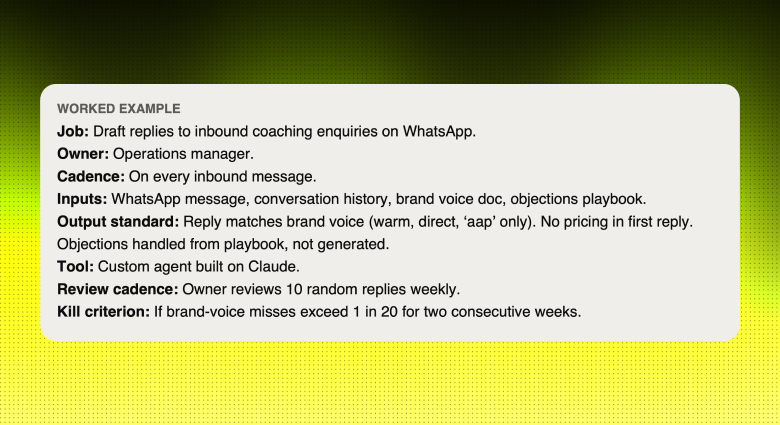
We don’t add a tool until the Job Card is filled in. It’s a single page. It takes 10 minutes. Most jobs that fail this exercise didn’t deserve a tool to begin with.
JOB NAME
One sentence describing the work. Action-first.
OWNER
Person accountable for the output. Not a team.
CADENCE
How often the job runs. Daily, weekly, on-trigger.
INPUTS
What goes in. Where from. In what shape.
OUTPUT STANDARD
What good looks like. Specifically.
TOOL
The single tool used to do the job. Just one.
REVIEW CADENCE
When the owner audits the output. Weekly is the floor.
KILL CRITERION
The condition under which we retire this job-tool pairing.
THE GRAVEYARD
The quarterly kill list.
Half the discipline of a clean stack is not adding bad tools. The other half is killing the ones that quietly stopped earning their slot. Every quarter, we run this exercise. It takes an hour. Every time, the team feels lighter afterwards.
Step 1 — List every tool the team is paying for.
Pull the list from billing. Not from memory. Memory is generous, billing is honest.
Step 2 — Map each tool to a Job Card.
If a tool can’t be mapped to a single Job Card with a named owner, it’s already on the kill list. If two tools map to the same Job Card, one is theatre. Pick one to keep.
Step 3 — Score each survivor on four signals.
- Used by the owner in the last 7 days?
- Used at least at the named cadence?
- Output trusted by the consumer of the work?
- Owner would notice in 24 hours if the tool went dark?
If any score is no, the tool goes on a 30-day probation. If two are no, it’s killed today.
Step 4 — Cancel and announce.
Cancel the subscription. Announce the kill in the team channel. Killing publicly is what makes the discipline stick. Nobody wants to be the person whose pet tool died, so people stop introducing tools they can’t defend.
WHAT WE LEARNED
Our last graveyard cycle killed 4 tools, saved roughly Rs. 18K/month, and the team reported their workflows felt ‘quieter’ within a week. Nobody missed any of the four. That’s the test — if a tool would actually be missed, it survives. If not, it was tax.
YOUR TURN
Audit your stack this week.
If you only do one thing with this guide, run the audit. It takes 90 minutes. It will save you more than that in the first month.
Step 1.
Pull every AI tool subscription from billing. List them.
Step 2.
For each tool, write the Job Card from page 3. If you can’t fill all 8 fields in 5 minutes, the job isn’t real.
Step 3.
Run the four-signal score from page 4. Honest answers only.
Step 4.
Kill at least one tool. Even if your stack is clean. The discipline of killing matters more than what gets killed. Practice it.
If this was useful
This is part 1 of a 5-part editorial series on building AI workflows that actually compound. Real receipts from systems we run at Know AI. No jargon, no hype.
Follow @zeeel.ai on Instagram for the rest of the series.
TELL ME WHAT YOU KILLED
DM me on Instagram with the tool you cut and the job it was failing at. I read everything that comes in with the keyword JOBS. The patterns across replies become the next post.