
Job Descriptions for Software
By Zeel Jain
FIELD GUIDE- THE OPERATOR'S SKILL
Your AI doesn't need a better model. It needs a job description.
Half the work leaving your company is no longer done by a person. The skill that determines whether that work ships well - or quietly ruins your week - is the same one you have always used with people. Write it a job description. Manage it like a hire.
4
Operator rules
~50%
Of your output is non-human now
1 hr
To write the first JD
Software is a hire. The brief is the salary.
For most of your career, you have managed one of two things: yourself or other people. There is now a third thing in the mix, and you have quietly been promoted to manage it without anyone telling you.
The pattern repeats every time. When AI works, you gave it a clear, specific brief, whether you realized that was what you were doing or not. When it fails, you gave it a vague brief and hoped the model would figure out the rest. Output quality is downstream of instruction quality, exactly as it is when you onboard a junior employee.
This is not a prompting trick. It is the same management skill you already use with people, applied to a different medium. Define the role, name the inputs, set the standards, decide when the software should escalate, and revisit the brief as edge cases appear. You would never tell a new hire to "handle email," so stop saying it to your software.
The shift: treat every recurring AI workflow as a hire, not a tool. The prompt is the job description. Write it once, properly, and the same conversation can run for years instead of breaking on the third edge case.
RULE 01 · THE BRIEF
Write a brief, not a wish.
Specifics, not vibes.
"Draft emails for me" is a wish. It tells the model nothing about who is writing, who is reading, what voice to use, or what is off-limits. The model is not bad at email; your instruction was bad at being an instruction. Vague in, vague out, every time.
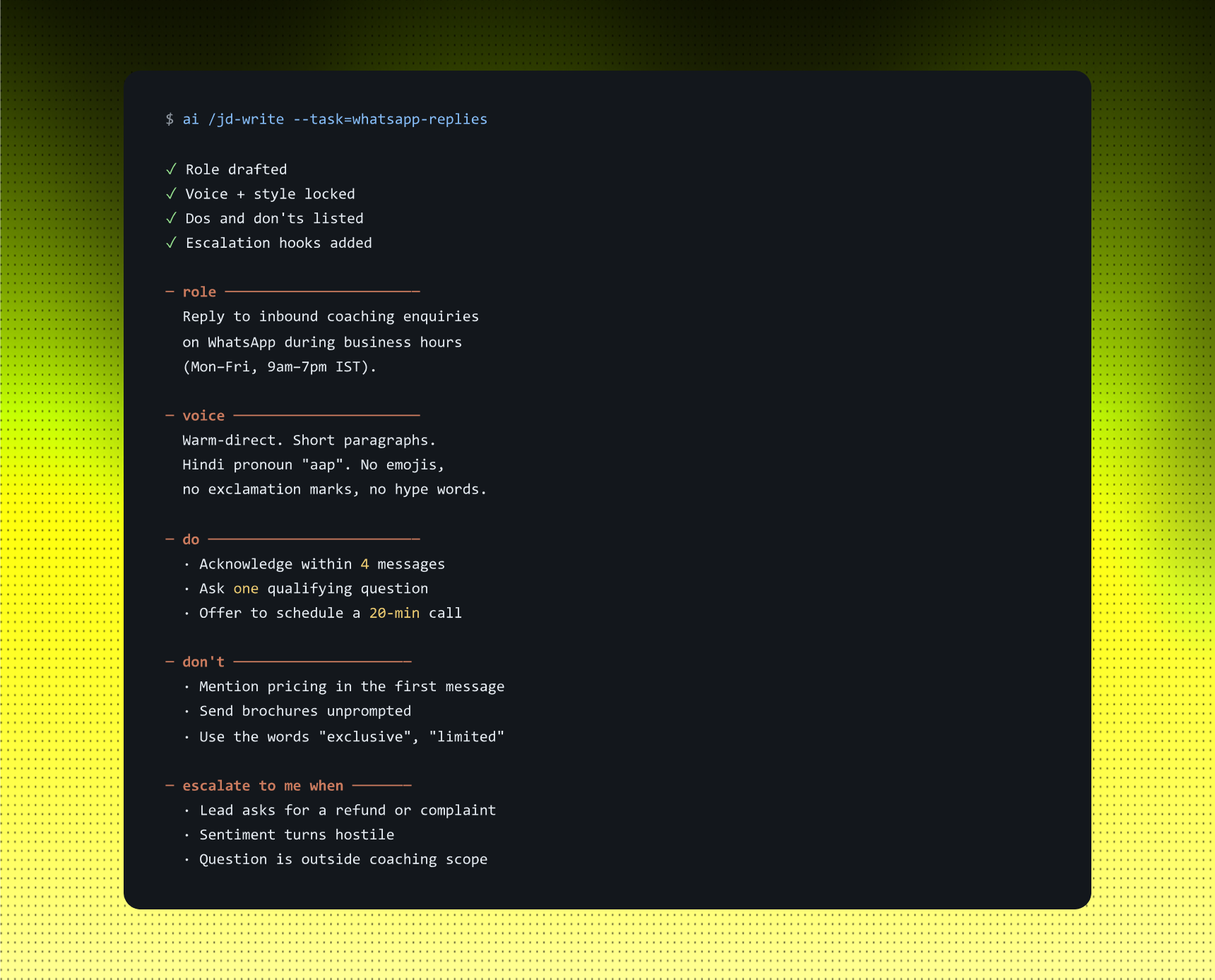
The shortcut: before any recurring AI task, write the job description on a single page. Include the role, voice, dos, don'ts, and escalations - the same structure you would hand a new hire on day one. The page becomes the system. The prompt becomes a reference to it.
Example: WHATSAPP INBOUND - COACHING ENQUIRIES
You tell AI: "Here is the job description for handling inbound coaching enquiries on WhatsApp. Use this every time. Ask before you deviate."
STRENGTHS
- Clarity scales; the job description is reusable across every prompt in the workflow.
- The voice locks. The output stops sounding like generic AI.
- Writing the job description surfaces gaps in your own thinking before they ship.
LIMITS
- The first job description takes 30 to 60 minutes. Treat it as an onboarding cost, not overhead.
- You'll find your own thinking is fuzzier than you assumed. That is the point.
- Edge cases still need you in the loop until you add them to the brief.
Use this when: any AI task you'll run more than three times. Below that, prompt freely. Above it, write the job description.
RULE 02 · THE INPUTS
Garbage in, confident garbage out.
The model was not confused. You were.
Most failures look like model failures, but they are not. The tool received something it did not know how to read: an unusual message format, a missing field, or an edge case nobody warned it about. Instead of stopping, it confidently produced the wrong thing. Confidence is not competence; it is the model's default voice.
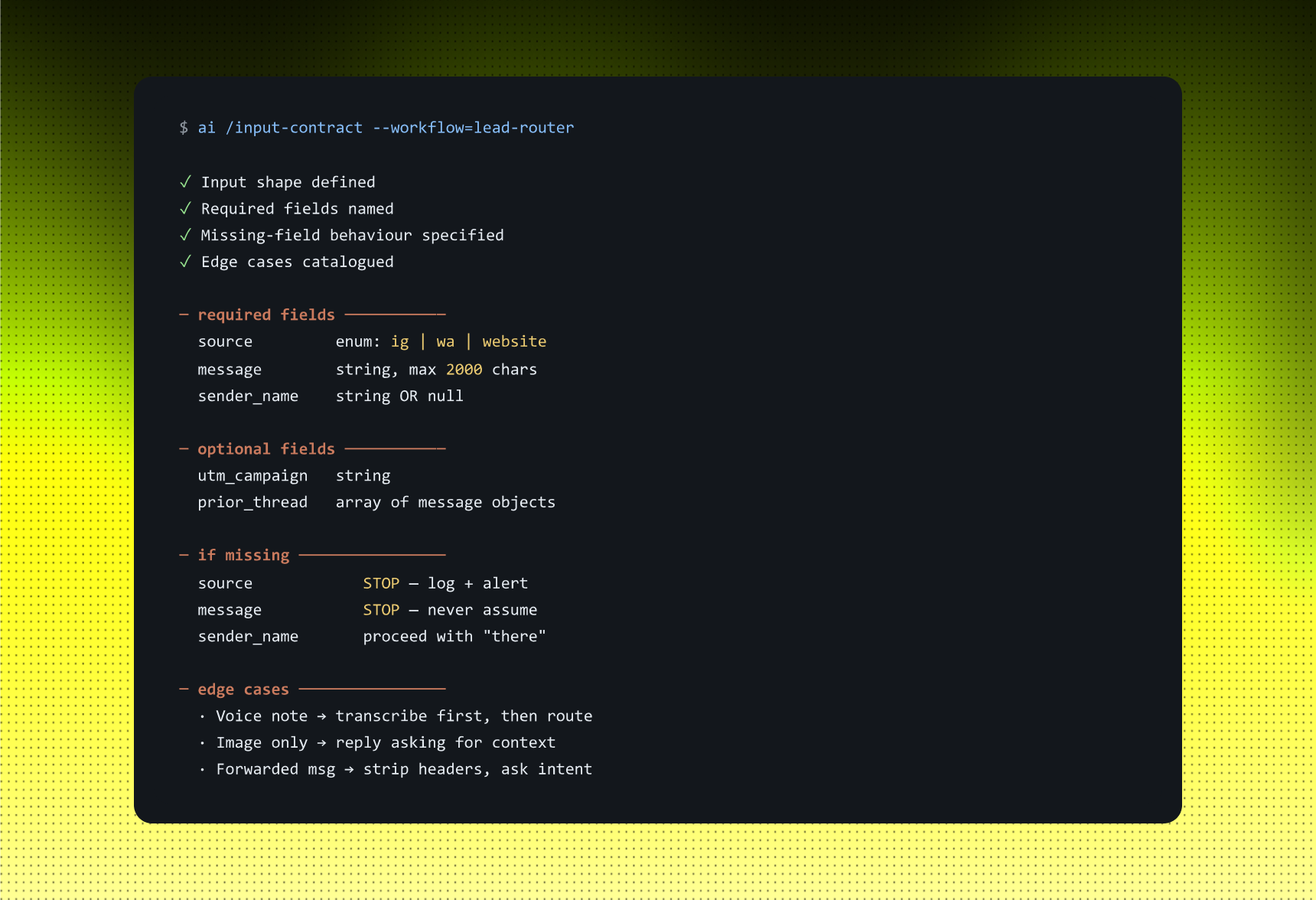
The shortcut: name the inputs explicitly. Define what the data looks like, what is required, what is optional, and what to do when a field is missing. Many "AI is wrong" failures disappear once you stop assuming the model can see what you can see.
Example: LEAD ROUTER INPUT CONTRACT
You tell AI: "Before you route any lead, here is the input shape you should expect. If anything is missing or malformed, stop and alert me. Do not guess."
STRENGTHS
- It stops more than half of "AI is wrong" failures at the door.
- It makes data drift visible, so you see the shape change before it breaks the workflow.
- It forces better data hygiene. You cannot define what you do not understand.
LIMITS
- Edge cases keep emerging. Schedule a quarterly review rather than treating the contract as a one-time task.
- The contract grows over time. Treat it as a living document, not a fixed one.
- Some inputs are genuinely ambiguous. The contract defines what to do in those cases; it does not wish them away.
Use this when: AI produces confident outputs that quietly turn out to be wrong, and those failures cluster around the same kind of input.
RULE 03 · THE ESCALATION
Tell it when to stop and find you.
Build the raise-a-hand rule on day one.
Software without escalation rules does not pause when something feels wrong. It keeps moving confidently in the wrong direction until someone notices what it has been doing all week. A junior employee would knock on your door at the third unusual request. AI will not, unless the job description tells it when to stop.
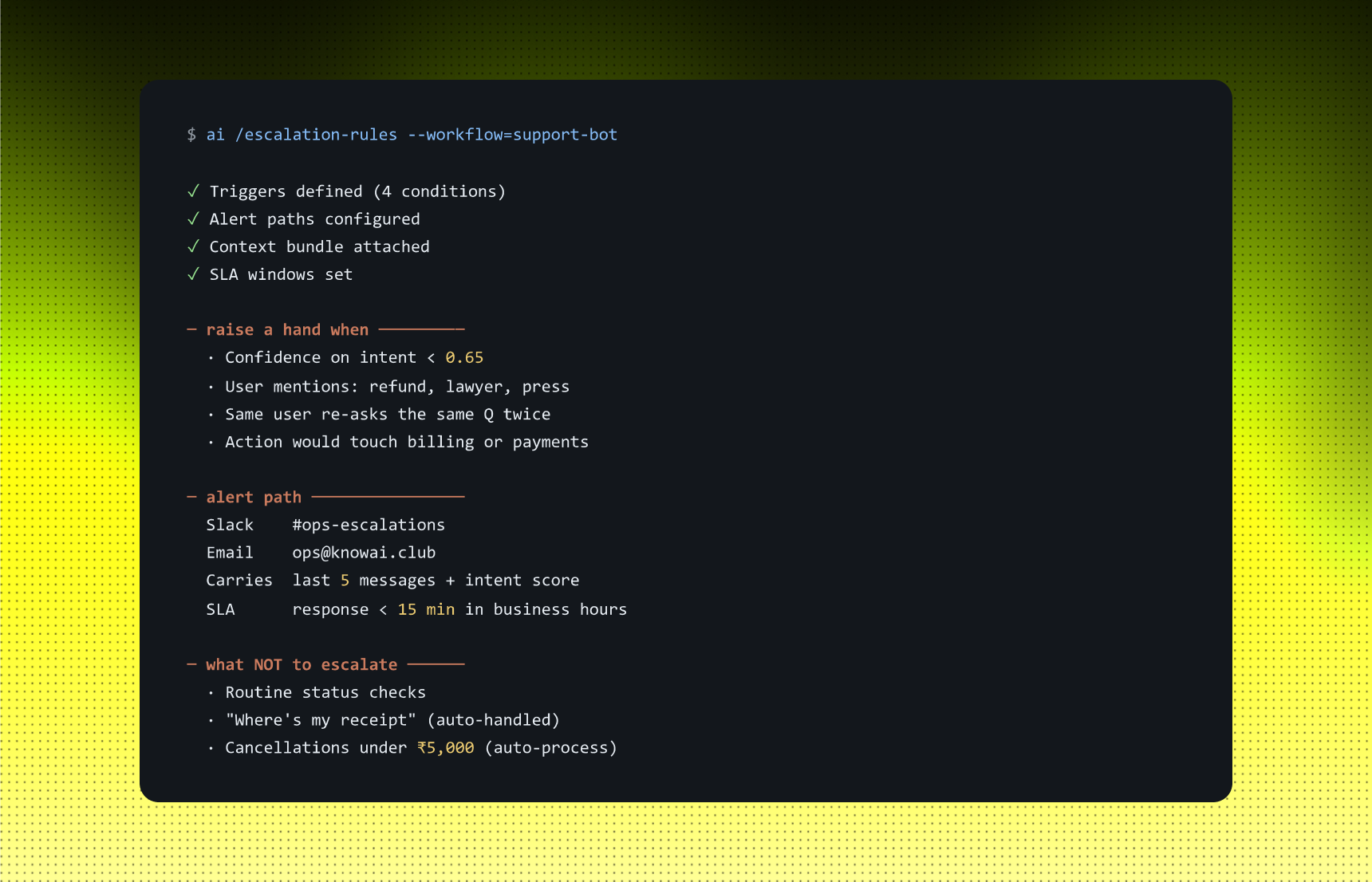
The shortcut: write the escalation rules into the brief. Define what triggers a stop, where the alert goes, and what context arrives with it. Doing this once costs roughly an hour. Skipping it can cost the week you spend unwinding what AI shipped while you were not looking.
Example: CUSTOMER SUPPORT ASSISTANT - ESCALATION RULES
You tell AI: "Run autonomously inside the rules below. For anything outside them, stop and alert me with context before doing anything customer-facing."
STRENGTHS
- It catches mistakes within hours, not weeks.
- It creates a paper trail of failure modes you can fix.
- It builds trust in the system, so you stop second-guessing every output.
LIMITS
- Too many escalations make the AI useless; too few let it ship nonsense.
- The threshold needs tuning during the first month: set it, watch it, and adjust it.
- Alerts work only if someone reads them. Decide who will respond, and when, before you ship.
Use this when: AI acts on your behalf with anyone outside your team, including customers, leads, hires, or vendors - anywhere the cost of a wrong output is not yours alone to absorb.
RULE 04 · THE ITERATION
Write it once. Then keep writing it.
A two-month-old prompt is not a system. It is a prayer.
Edge cases appear. Old assumptions turn out to be wrong. Your standards rise. Your week- twelve brief should look nothing like your week-one brief, not because the software improved, but because you did. Walking away after the first version turns a working system into one that slowly decays.
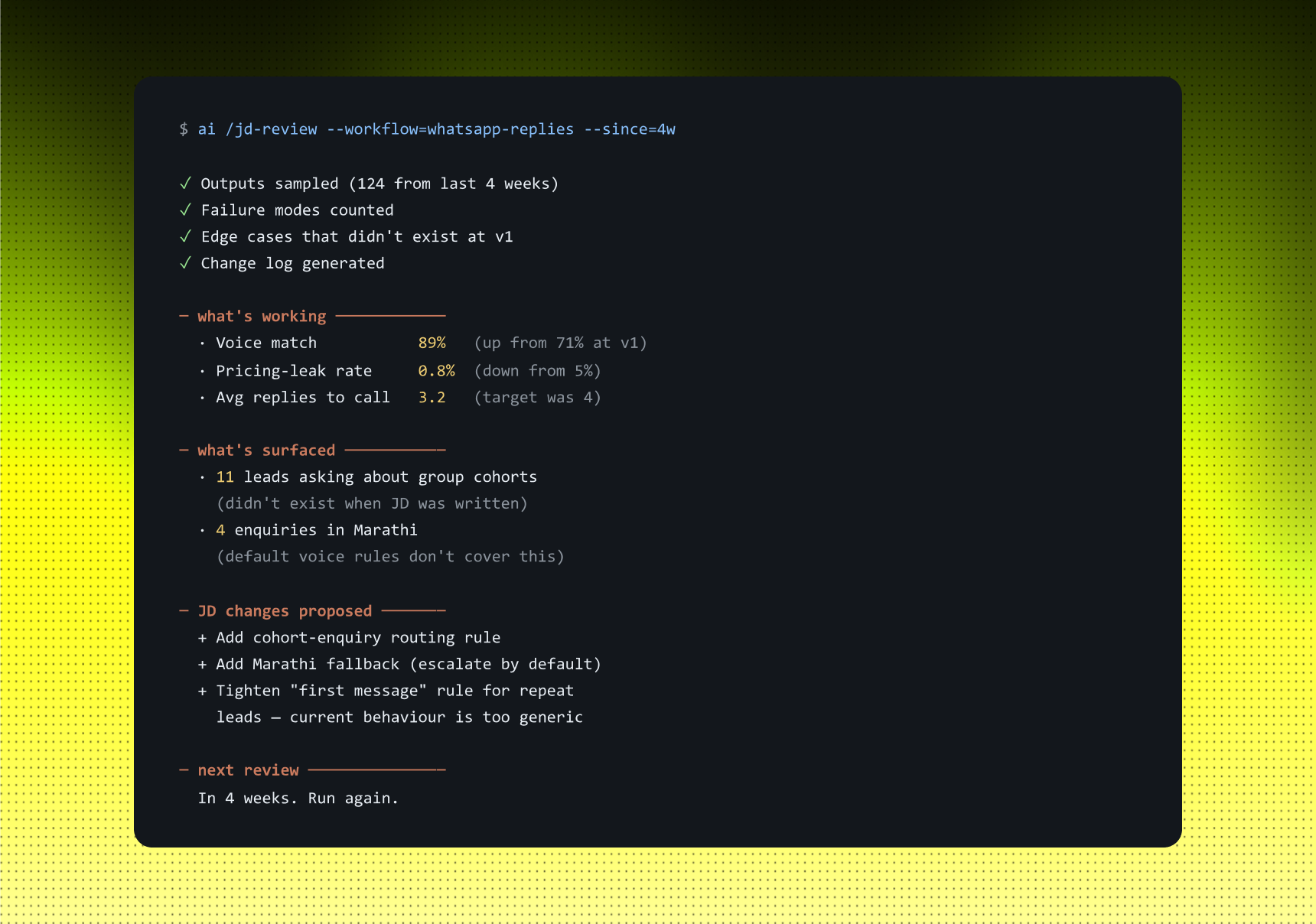
The shortcut: review the brief every two to four weeks. Examine what failed, what surprised you, and what you would now say differently. Update the job description. It is the same conversation you would have in a one-to-one meeting with a junior employee, in roughly the same amount of time.
Example: WHATSAPP REPLIES - MONTH-ONE REVIEW
You tell AI: "review the brief every two to four weeks. Examine what failed, what surprised you, and what you would now say differently. Update the job description. It is the same conversation you would have in a one-to-one meeting with a junior employee, in roughly the same amount of time."
STRENGTHS
- The system improves as you do instead of degrading as the world changes.
- Edge cases stop becoming customer complaints because you catch them during review.
- You stay close enough to the workflow to spot drift early.
LIMITS
- The system improves as you do instead of degrading as the world changes.
- Edge cases stop becoming customer complaints because you catch them during review.
- You stay close enough to the workflow to spot drift early.
Use this when: an AI workflow has run for more than a month without you reviewing what it produced. That workflow may be the most expensive thing in your stack right now.
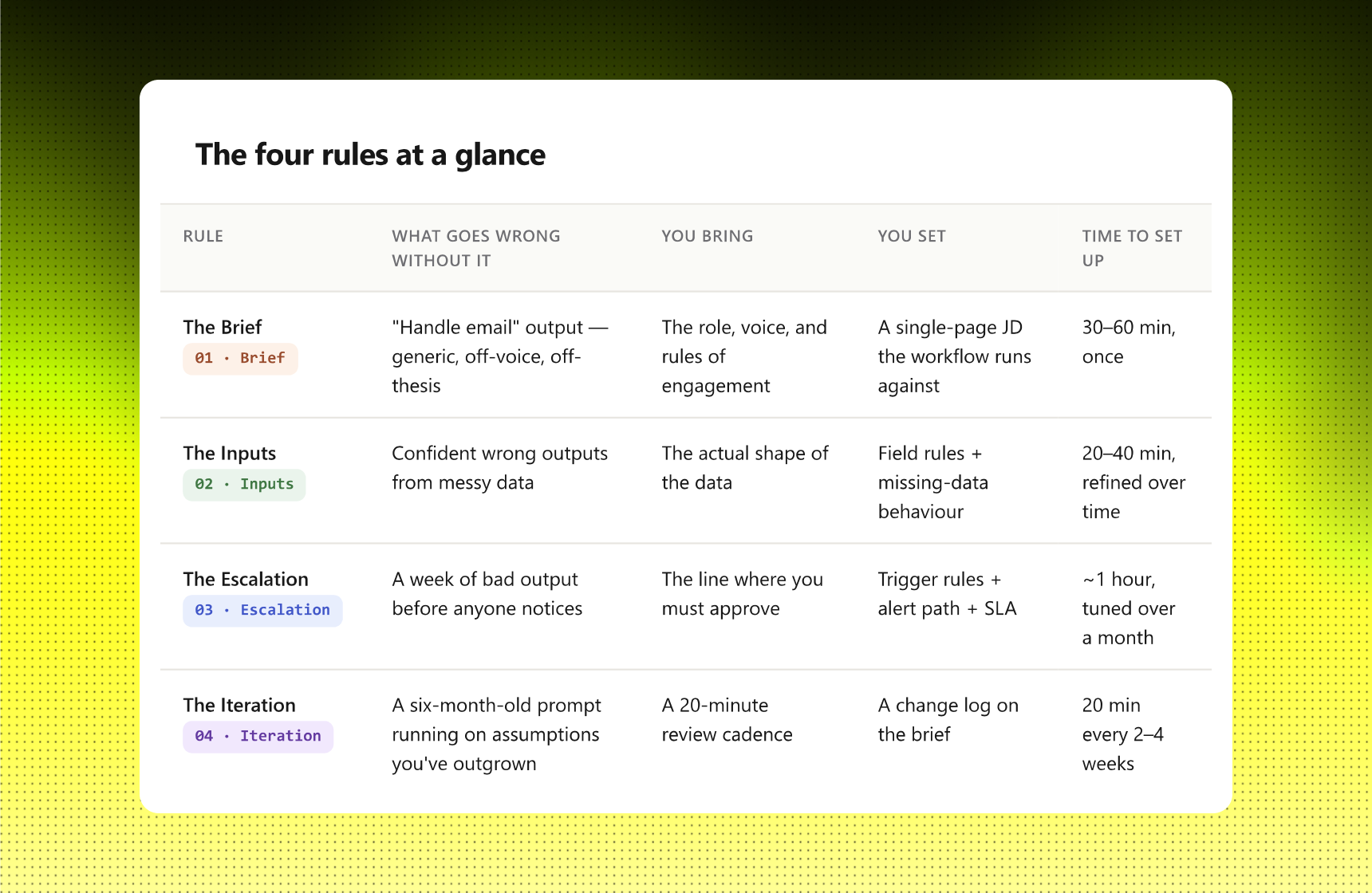
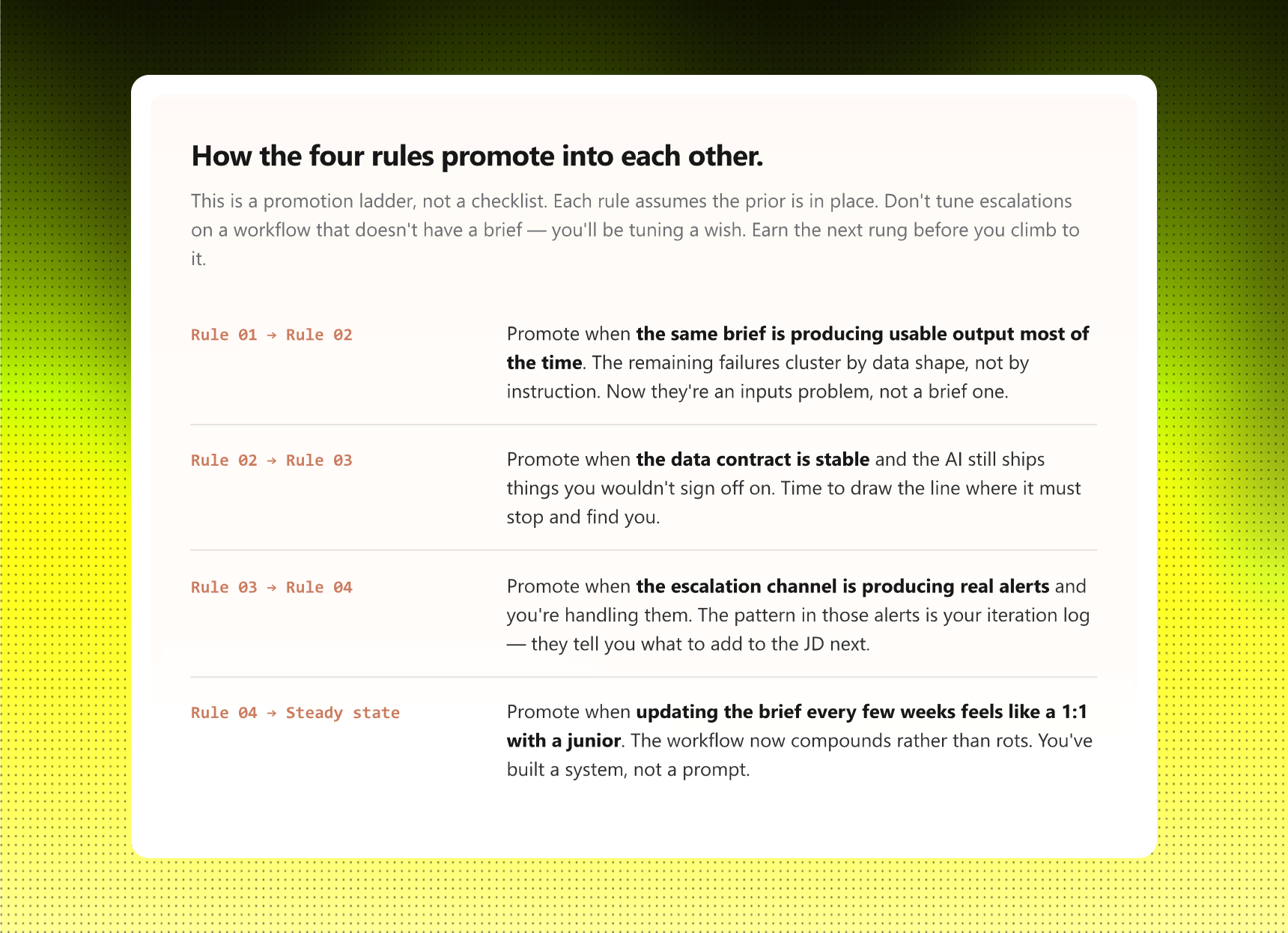
The four rules at a glance
How to start.
Pick the AI workflow already running in your week - the one you set up months ago and have not reviewed since. That is where the leverage is, because it is already producing output you have stopped reading.
Write the job description as if you were onboarding a new hire on Monday. Define the role, inputs, voice, dos, don'ts, and escalations on one page. Then run the workflow against the job description for two weeks and read what it produces. The gap between the brief and the output is your second draft.
Do not try to brief everything. Pick one workflow. The skill compounds: the second job description is easier than the first because you have seen the shape, and the third is easier than the second. A good operator with two well-managed workflows beats a great prompter with twenty unmanaged ones.
The promotions will not go to whoever used AI the most. They will go to whoever's AI produced something worth showing, because they wrote better job descriptions for it.