
Claude for Interior Designers
By Zeel Jain
FIELD GUIDE - STUDIO WORKFLOWS
FOR INTERIOR DESIGNERS
Where Claude earns its seat in a design studio.
Four workflows that turn the admin tax of an interior design practice - concept briefs, space plans, client proposals, weekly updates - into ten-minute outputs.
4
Workflows
~14h
Saved per project
10 min
Proposal turnaround
Design is sold as a creative business. It runs as a documentation one.
Every project ships through written deliverables - mood board briefs, space plans, fee proposals, weekly updates. The work clients actually pay you for happens in between.
The math is brutal once you look at it. A typical residential project burns 12 to 16 hours a week on documents that wrap the design rather than carry it. Concept directions get retyped. Floor plans get explained. Proposals get rebuilt from a template that doesn't quite fit. Friday updates get scrambled together before the client call.
None of that work is the design. All of it is the cost of running the design business.
The shift: stop writing the documents that wrap your studio's work. Generate them in a structured shape, edit for voice, ship. The hours you reclaim are the ones you take back into the design itself.
WORKFLOW 01 · CONCEPT
The mood board brief.
Client brief in, complete concept direction out.
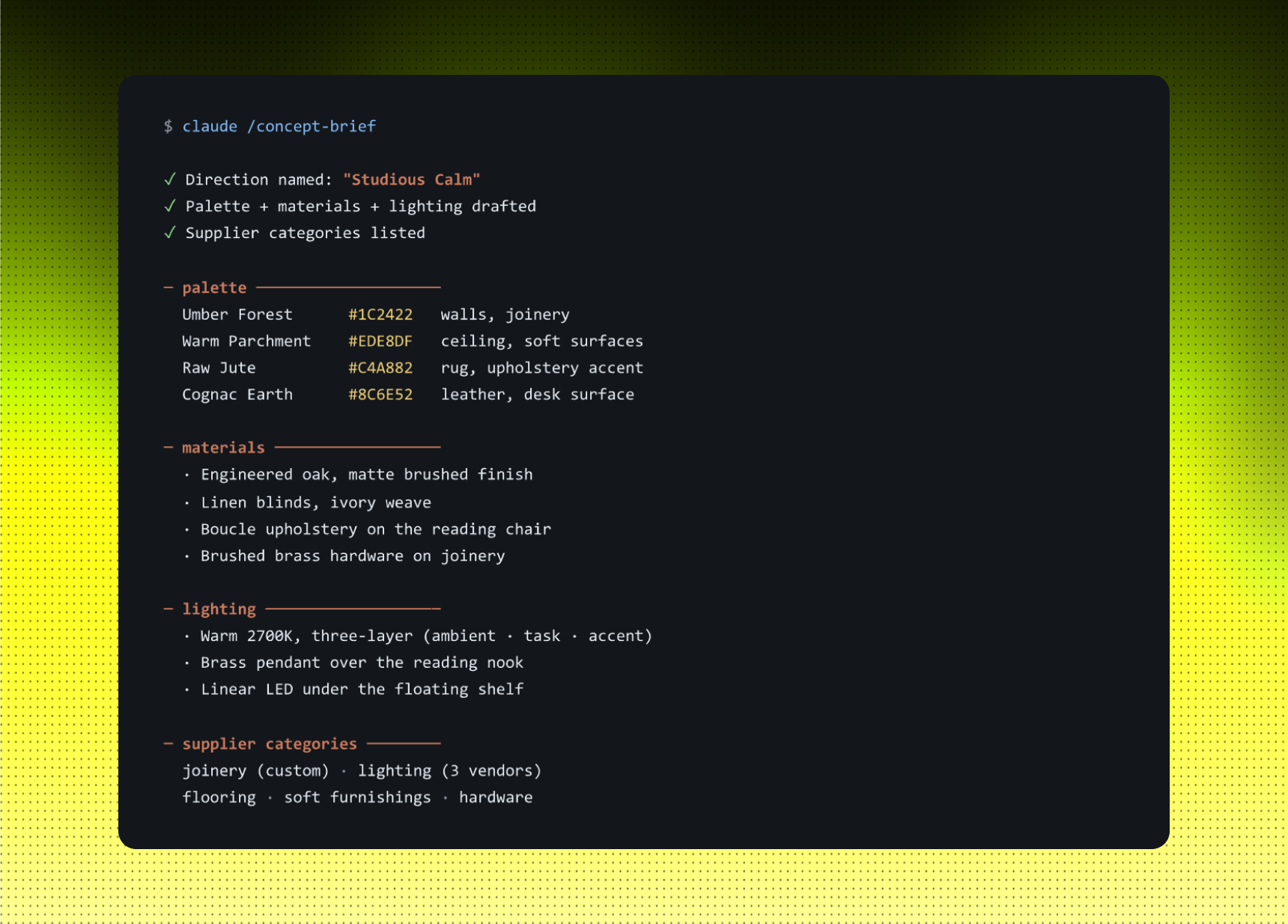
Every project starts with the same gap: the client gives you a few sentences of intent, a rough budget, and a set of dimensions. Somewhere between that conversation and your first mood board, a structured concept brief has to exist - palette, materials, lighting, supplier categories. That document is what your team or your contractor actually works against.
The shortcut: paste the client's vision, the budget, and the space details into Claude. Ask for a complete concept direction. You get a named palette with hex values, material references, a lighting approach, and the supplier categories you'll need to source - in a shape ready to hand to a junior, a vendor, or present in the kick-off.
Example: STUDIO CALM, 240 SQFT HOME OFFICE
You tell Claude: "Here's the brief: 240 sqft home office, founder working from home, north-facing, 6L budget. Wants quiet, focused, warm. Build the concept direction."
STRENGTHS
- One paste-in, complete direction out - no blank-page problem.
- Palette comes pre-named with hex values you can drop into a board.
- Supplier categories double as your day-one procurement checklist.
LIMITS
- Direction is a starting point, not a final mood board.
- Your studio's signature lives in the edits you make on top.
- Material choices still need a sample review before you commit.
Use this when: a new project just landed and you need to align the team - or the client - on a direction before the first design meeting.
WORKFLOW 02 · SPACE
The space planning report.
Floor plan in, written spatial logic out.
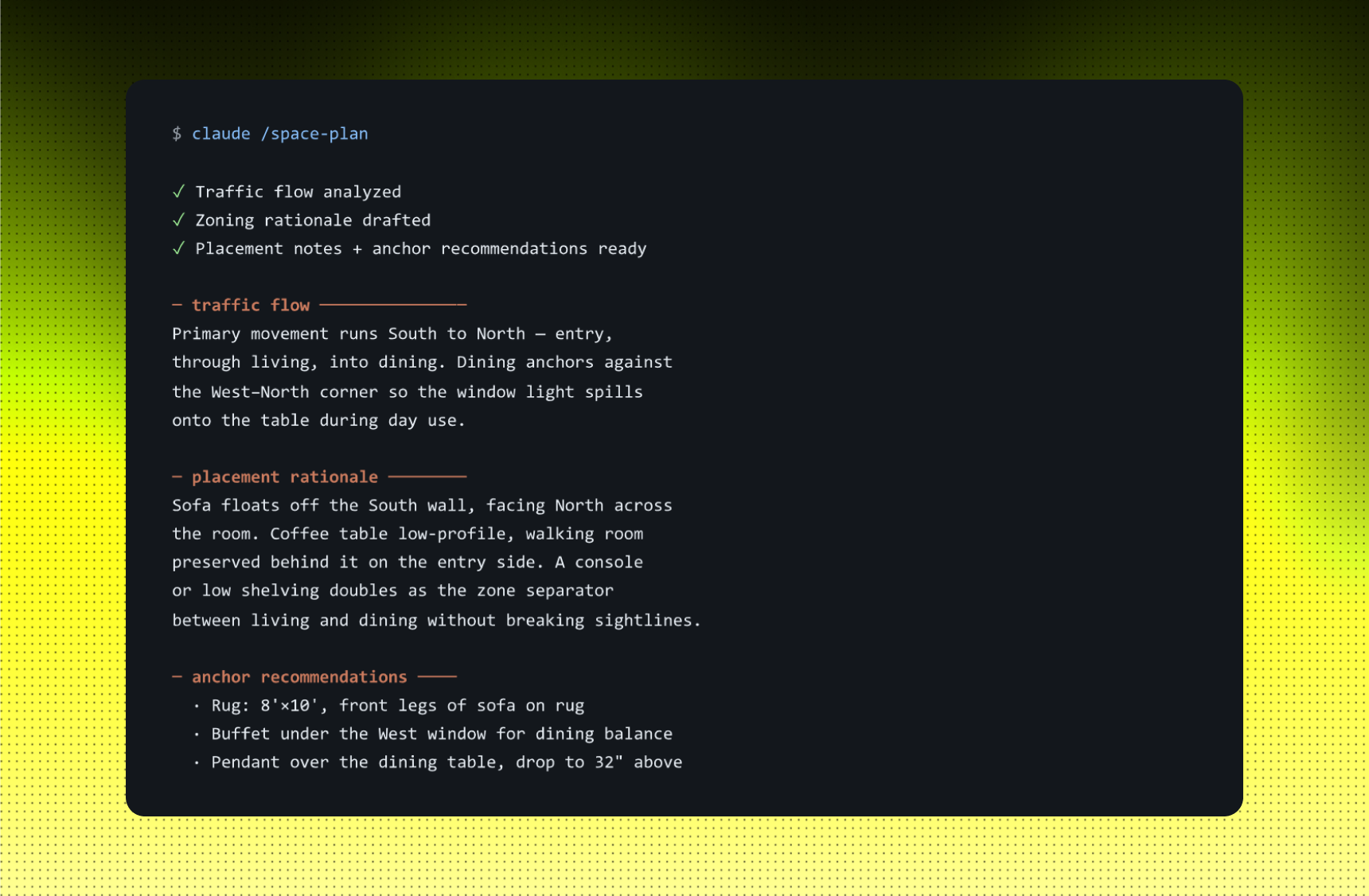
A floor plan is a drawing. A space planning report is the explanation that sits beside it - traffic flow, zone rationale, furniture placement, the reasoning a junior designer needs to brief a contractor or a client needs to follow a walkthrough. It's the document everyone wants and no one wants to write.
The shortcut: hand Claude your plan notes - dimensions, zone labels, where the doors and windows sit. You get back a structured written report in the format you'd normally spend two or three hours assembling: a traffic-flow read, the rationale for each placement, and a recommendation list for the anchor pieces.
Example: COMBINED LIVING + DINING, 22 x 18
You tell Claude: "22ft x 18ft combined living and dining. West window. South entry. North wall solid. Anchor a dining table and a 3-seater sofa."
STRENGTHS
- Turns a sketch into the written deliverable clients ask for.
- Junior designers can run on it without you re-explaining each zone.
- Forces the "why" of placement onto the page: better than your verbal notes.
LIMITS
- Only as good as the dimensions and zone labels you feed it.
- Site quirks - beams, low ceilings, plumbing risers - need a site visit, not a paste-in.
- Style references still come from you, not from the report.
Use this when: you're handing the project off to a junior, or presenting to a client who needs to understand the reasoning behind a layout, not just see it.
WORKFLOW 03 · CONTRACT
The 10-minute client proposal.
Scope in, full proposal in your tone out.
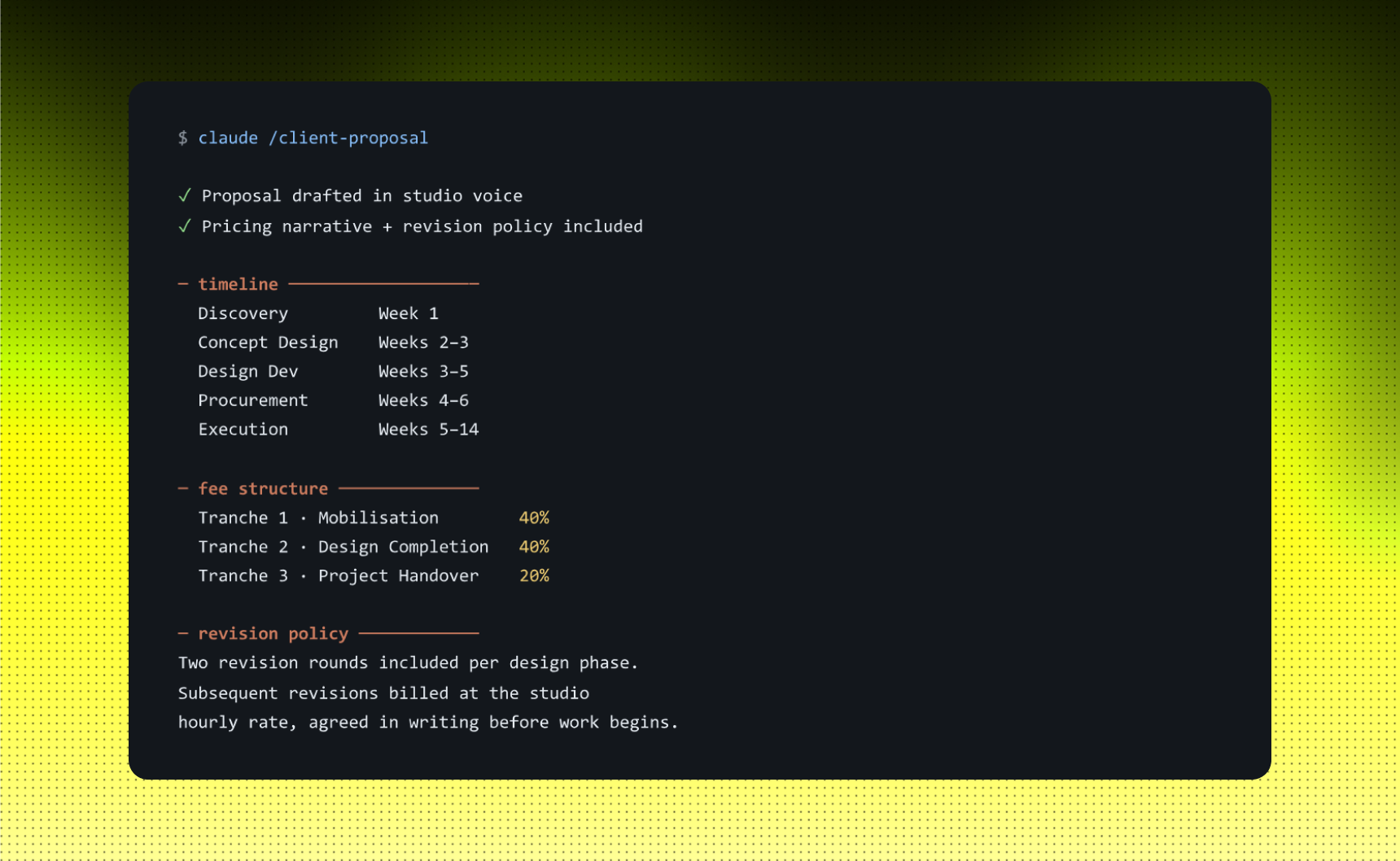
A proposal is the document that costs you sleep. Every studio has a template, every template needs to be reshaped for the project, and the rewrite always lands the night before it's due. The slow part isn't the pricing - it's the narrative: how the studio works, what's included in each phase, how revisions are handled, how payment tranches map to deliverables.
The shortcut: drop the project scope, timeline, and deliverables into Claude - along with a sample of your studio's previous proposals so it picks up your tone. You get back a full proposal: pricing narrative, phase-by- phase process, fee tranches, revision policy. Edit the numbers, sign, send.
Example: 1200 SQFT TURNKEY, 14 WEEKS
You tell Claude: "1,200 sqft 3BHK turnkey in Bandra. 14 weeks, possession April. Full design + execution + handover. Use the tone from our last three proposals."
STRENGTHS
- Cuts proposal drafting from a night's work to a coffee break.
- Pricing narrative reads like your studio, not a template.
- Revision policy is built in - the clause that protects your scope.
LIMITS
- Numbers still require your eyes - don't ship the percentages it generated.
- Legal terms need a lawyer once, not a regenerate.
- Tone only matches your studio if you feed it a real sample to learn from.
Use this when: a lead came in this week and a proposal is expected before the next call.
WORKFLOW 04 · EXECUTION
The weekly client update.
Project folder in, Friday brief out.
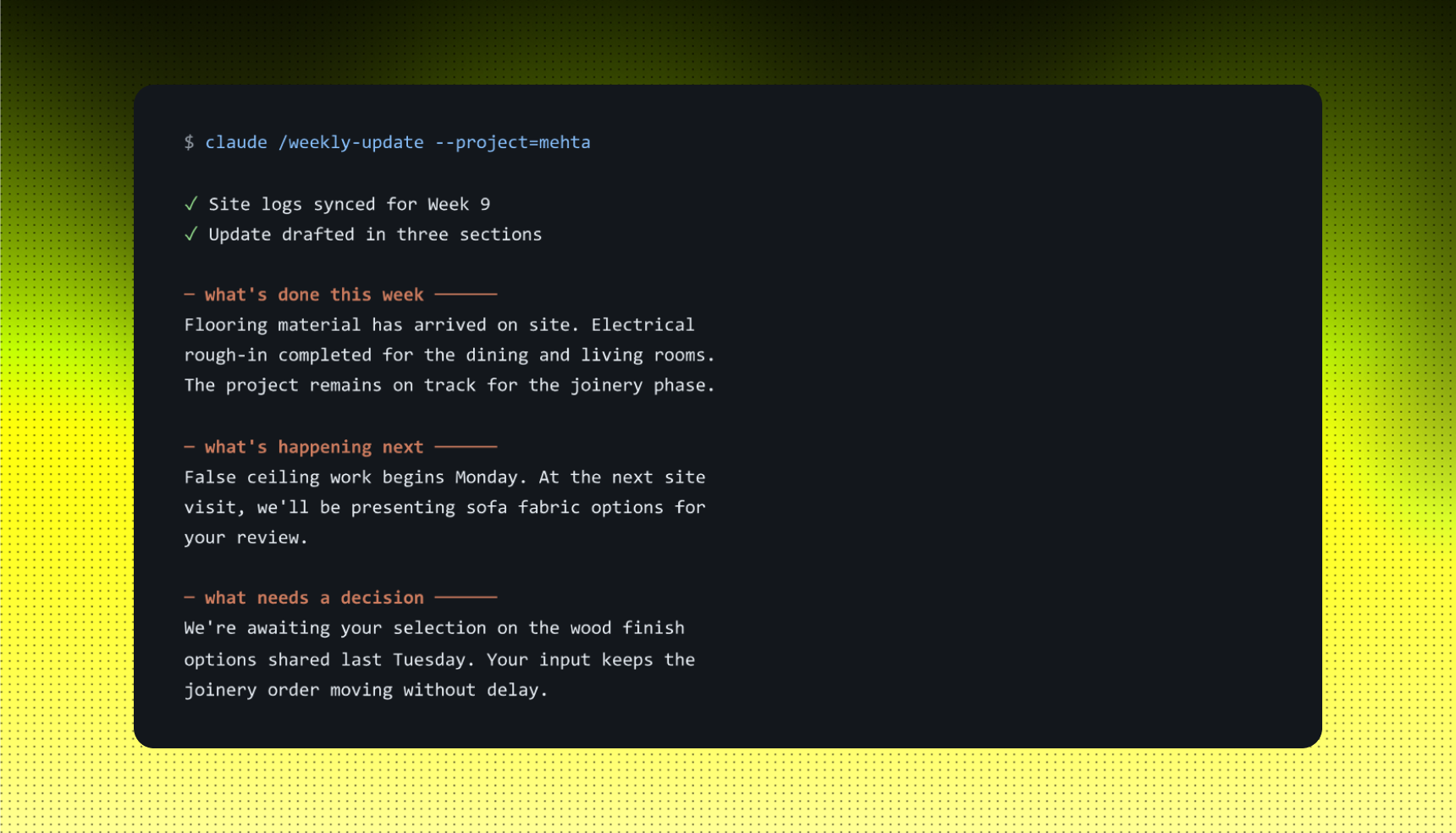
The Monday morning scramble is the most expensive hour of the studio week. Site visit notes are scattered, contractor messages are buried in WhatsApp, the client is expecting a clean update by 10am. You end up writing the same three sections - what's done, what's next, what needs a decision - from memory.
The shortcut: connect Claude to your project folder. Every Friday it pulls the week's site notes, vendor confirmations, and outstanding decisions, and produces a structured client update. Three sections, ready to send. Mondays start with a sent email, not a scramble.
Example: MEHTA RESIDENCE, WEEK 9
You tell Claude: "Pull this week's logs from the Mehta Residence folder and draft the client update."
STRENGTHS
- Three-section shape clients learn to expect and trust
- Decisions section flushes out blockers before they slip a week.
- Friday-drafted, Monday-sent - no morning-of writing.
LIMITS
- The update is only as honest as the notes in the folder.
- Site-visit observations still need a paragraph from you.
- Tone needs a one-line edit if the client prefers warmer language.
Use this when: a project is in execution and the client expects a weekly read on progress without chasing.
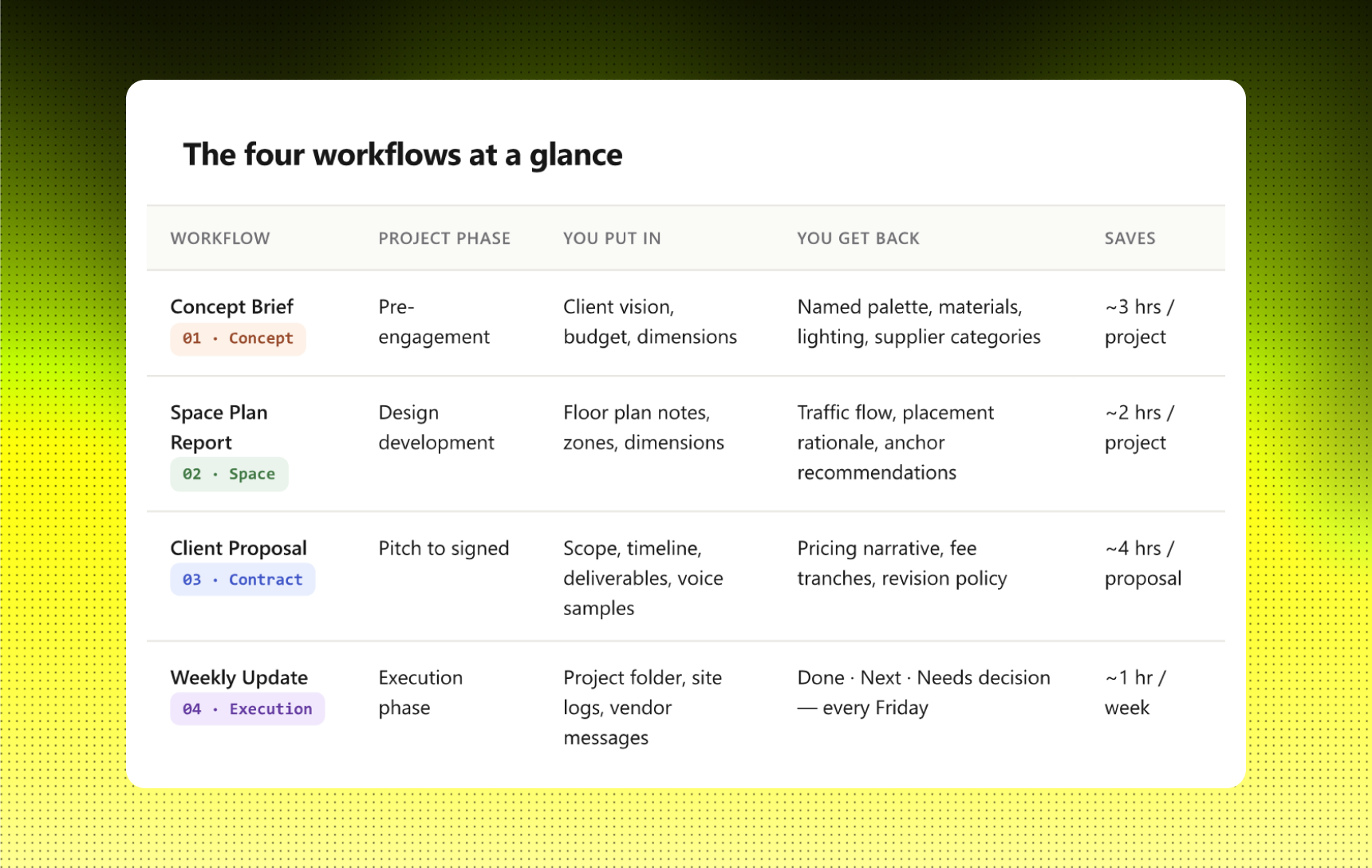
The four workflows at a glance
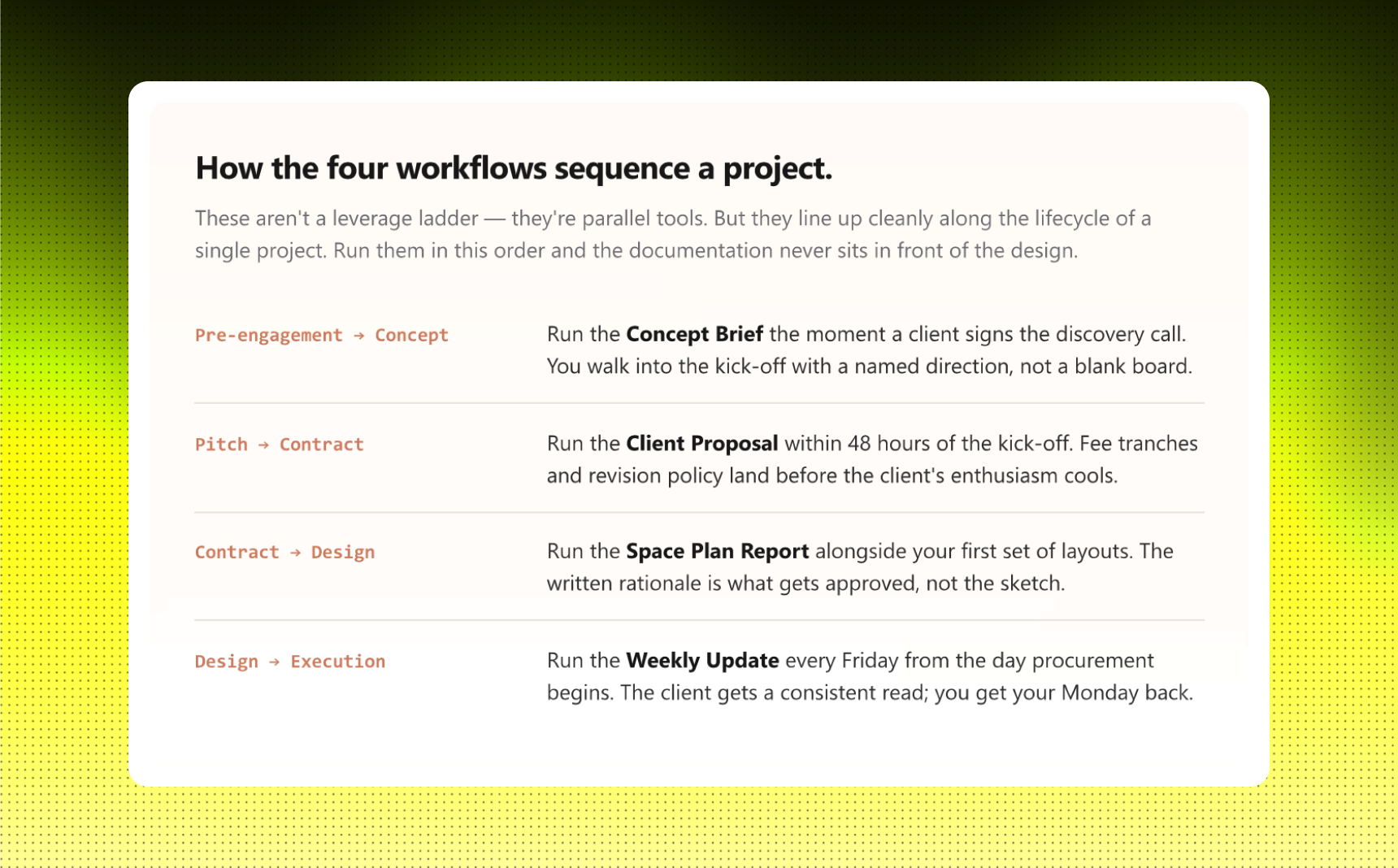
How to start.
Pick the workflow that's burning you most this week. Not the one that sounds most impressive - the one that's eating an evening. For most studios, that's either the proposal or the Friday update.
Run it on a live project. Not a test case, not a hypothetical. The first output will be 70% there. That's the point - the remaining 30% is the part that makes it sound like your studio, not anyone else's.
Notice what you edit. The edits are the signal. They're where your taste lives, and they're what you teach Claude next time by feeding the edited version back as a reference. The output you tweak less each week is the workflow becoming yours.
The studios pulling these four hours back into the design don't have a different tool. They have a different relationship with the documents.