
Claude Team Usage Dashboard
By Zeel Jain
Field Guide - Founder Visibility
Make every dollar your team spends inside Claude legible.
Four dashboard views that turn an invisible AI build budget into a number you can read in thirty seconds: by person, by project, by week.
4
Dashboard views
Per-person
Project + token breakdown
0
Cost trend lines
Most AI build budgets are run on conviction, not evidence.
You approved the plan. Your team builds. Every week the bill grows, and every week the only question you can actually answer is is it still worth it.
The honest answer to who is spending what, on which project, against which outcome lives buried in an invoice line item, not in a place a founder can read between meetings. So the conversation never gets sharper than a vibe. Either the bill feels fine and nobody asks, or the bill spikes and everybody panics.
Both modes are expensive in their own way. Conviction without evidence funds the wrong projects for too long. Panic without context kills the right ones too early.
The shift: stop treating AI spend as one opaque monthly number. Break it out by contributor, by project, and by week. Once it's visible, every founder conversation about it gets shorter, and most of them stop being arguments.
STEP 01 · PRESENCE
The team status board.
A roster glance: active, idle, offline, in one screen.
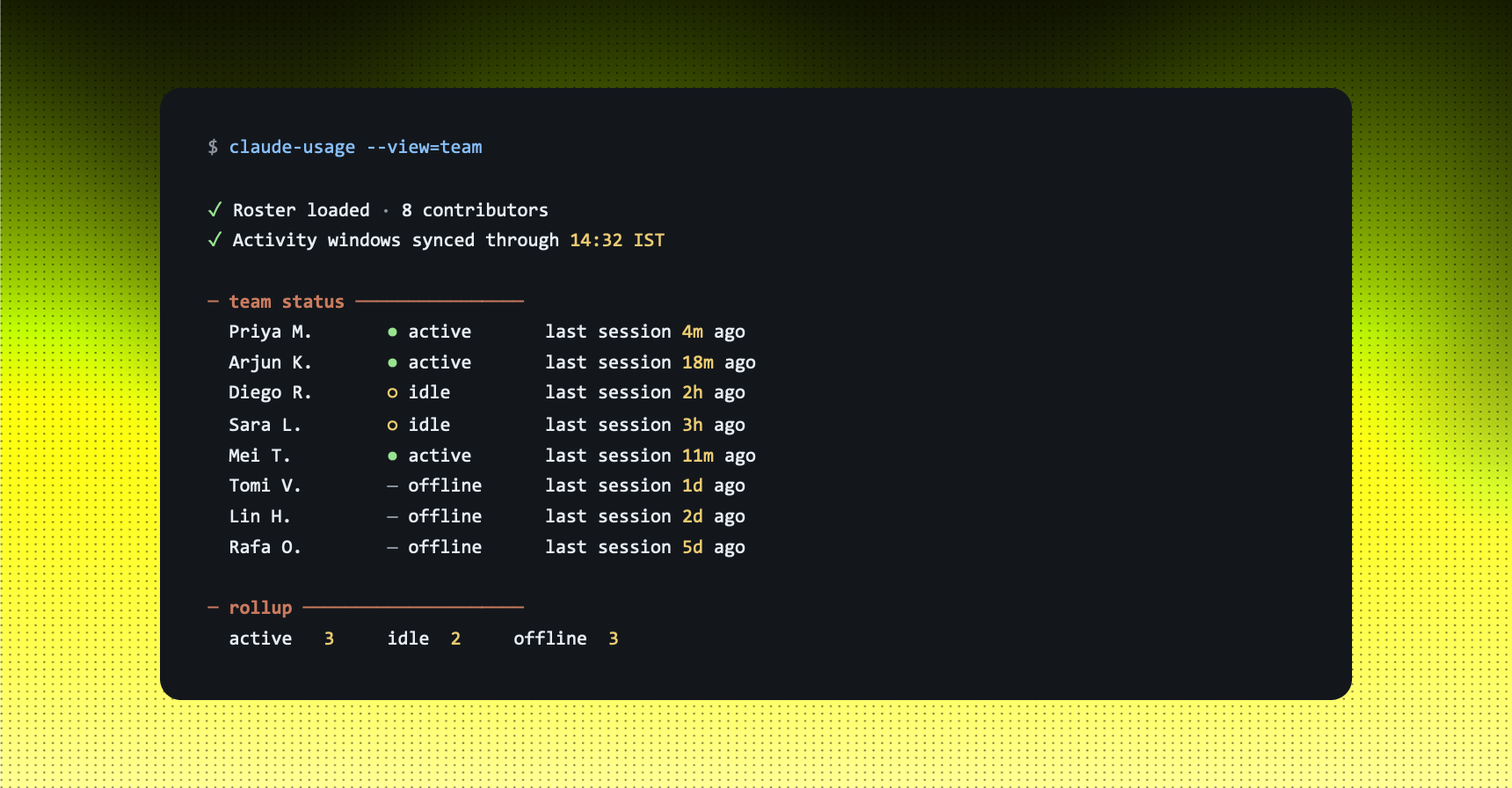
Before you ask about cost, ask about rhythm. The first thing a founder needs to know is who, on the team, is actually building with Claude this week, and who hasn't touched it since onboarding. That second group is where adoption is leaking out the back, quietly, without anyone flagging it.
The shortcut: a single board that shows every contributor with one of three states: active, idle, or offline, alongside the time of their last session. No interpretation, no scoring. Just presence. You read it the way you'd read a flight board.
Example: EIGHT-PERSON ENGINEERING TEAM, MID-WEEK
You run: "Show me the team's Claude activity right now."
STRENGTHS
- Three-state rhythm reads at a glance, no chart to interpret.
- "Offline" surfaces ramp-up gaps you'd otherwise hear about a month late.
- Replaces the standup question "what are you working on with Claude this week."
LIMITS
- Activity counts sessions, not output quality.
- Doesn't capture work done off the tracked machine or account.
- An "active" green dot is presence, not progress.
Use this when: you want a 10-second answer to "is the team actually using what we're paying for", before you spend any time on the cost question.
STEP 02 · ATTRIBUTION
The per-person drill-down.
One click on a name, the full project bill.
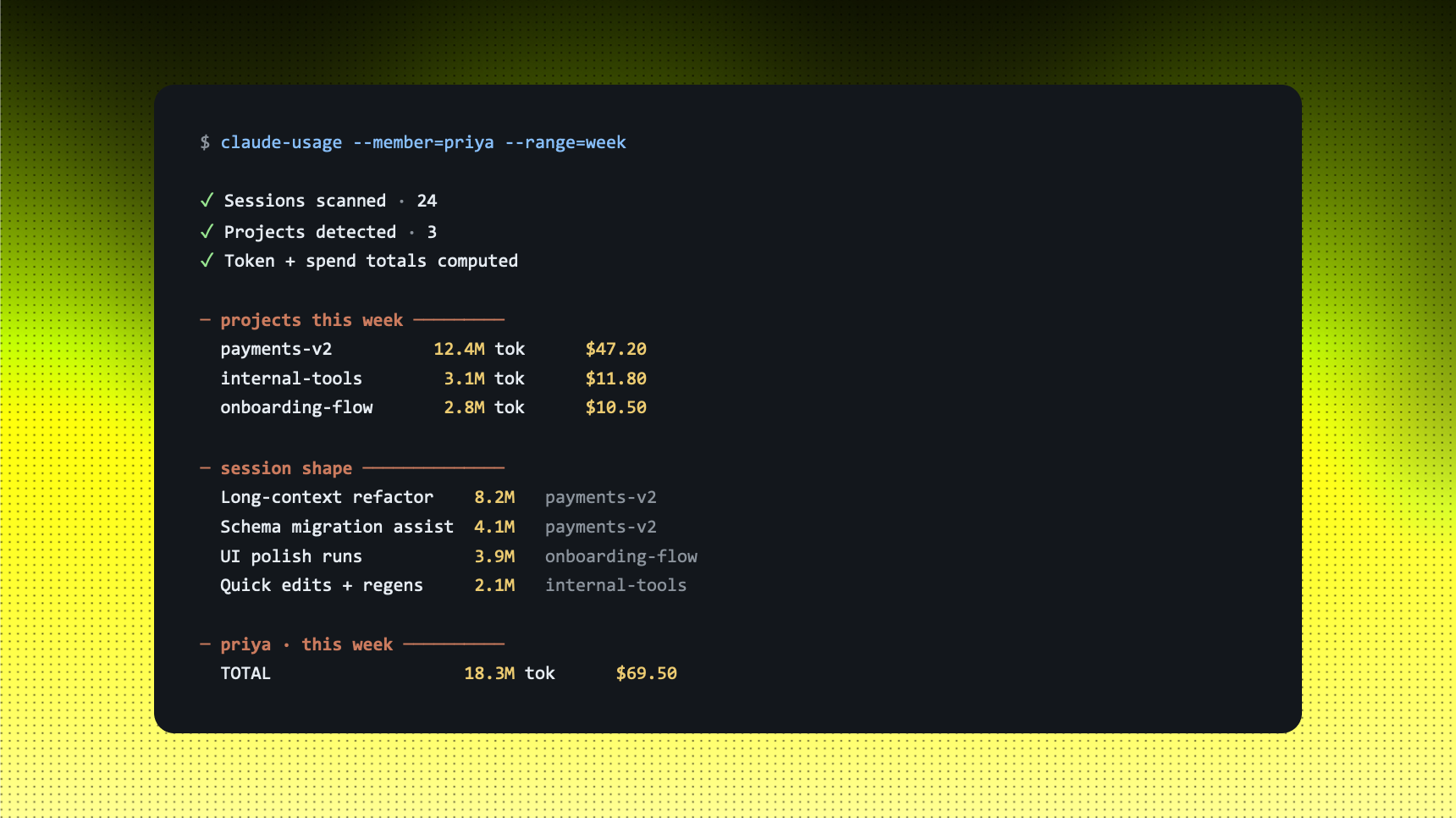
The team board tells you a name. The drill-down tells you that name's story. Click into a contributor and you get the projects they've been working on this week, each one with its own token total and estimated cost. This is where most founder questions actually live: not "what did we spend?" but "what did this person spend, on which thing?"
The shortcut: the per-person view rolls every session that contributor ran into a list of projects, sorted by spend. You see the headline number, the per-project split, and the session shape underneath the long-context refactors, quick edits, repeated regenerations. The story behind the number, not just the number.
Example: PRIYA - THIS WEEK
You run: "Show me what Priya worked on with Claude this week and what each project cost."
STRENGTHS
- Attributes burn to scope, not headcount, the right unit for a founder.
- Catches a runaway long-context session before payday, not after.
- Session shape explains the number, refactor vs regenerate vs polish.
LIMITS
- Tokens spent is not value delivered; pair with shipped commits.
- A high-token week can be productive deep work or wasted regen loops.
- Project detection relies on the directory or repo, naming drift breaks it
Use this when: a number on the team board looks unusually high, or when finance asks you to attribute the month's bill back to a feature.
STEP 03 · ESTIMATE
The estimated bill.
Tokens converted to dollars, the way finance reads them.
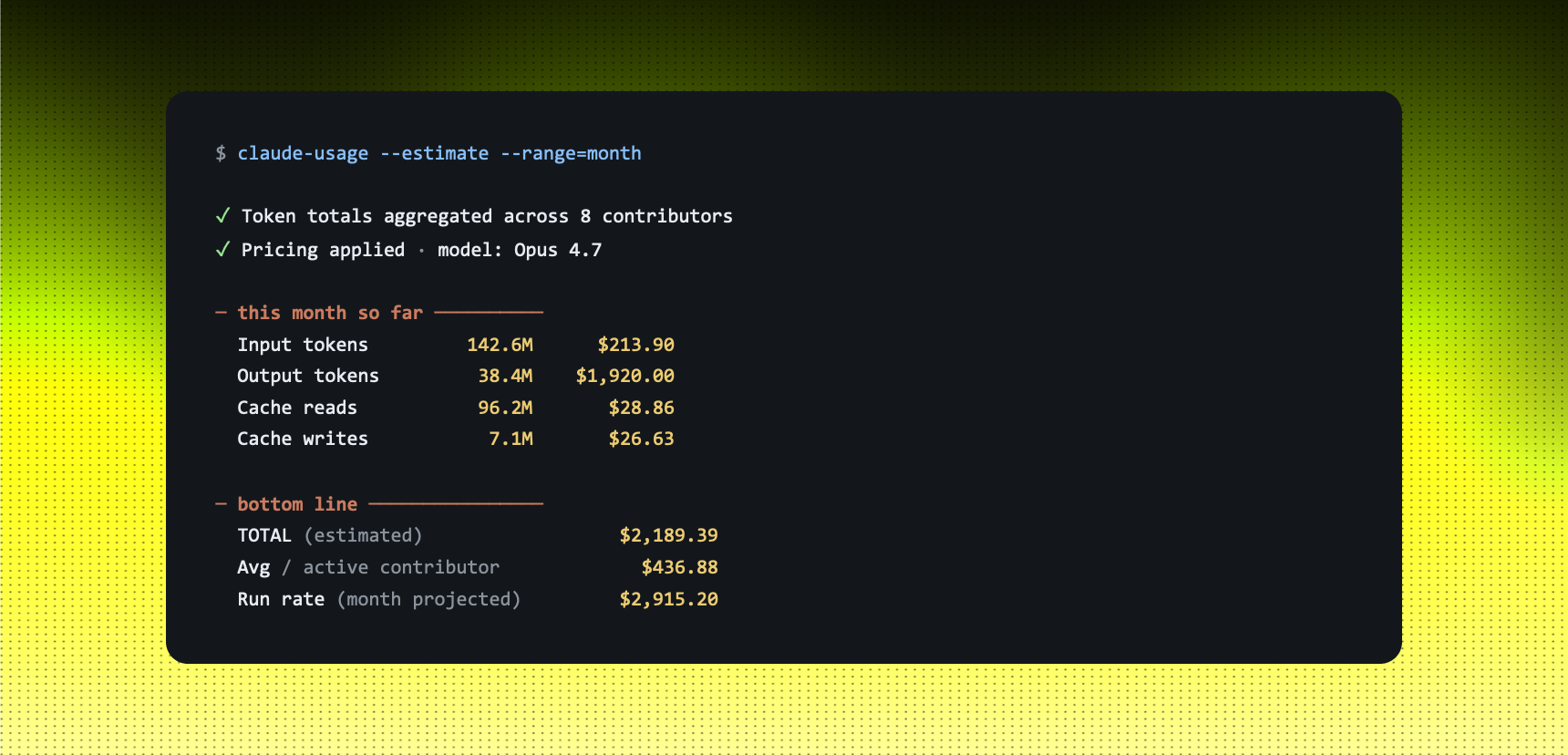
The dollar number is the one your CFO actually wants. The trick is that no team running multiple Claude models, with caching on, can answer it from gut feel. Input tokens, output tokens, cache reads, cache writes, each priced differently, each accumulating quietly across the week.
The shortcut: the estimate view does the multiplication for you. It pulls the team's token totals, splits them into the four categories that drive the bill, and applies the current per-million pricing for whichever models you're using. You get a number that lands within a few percent of the invoice, close enough to plan against, broken down enough to audit.
Example: WHOLE TEAM. MONTH-TO-DATE
You run: "What's the team spending on Claude this month?"
STRENGTHS
- One screen replaces digging through the API console and an invoice export.
- Input · output · cache split makes the math auditable, not magical.
- "Per active contributor" gives you a unit number you can budget against.
LIMITS
- List pricing only, your contract rate is what closes the final gap.
- Cache savings swing the total ±20% week to week.
- It's a forecast, not a finance source-of-truth. Reconcile to the invoice monthly.
Use this when: finance asks for the number, or before a budget conversation you'd rather not have on instinct.
STEP 04 · TREND
The week-on-week curve.
Weekly and monthly trend lines, the way the budget call needs them.
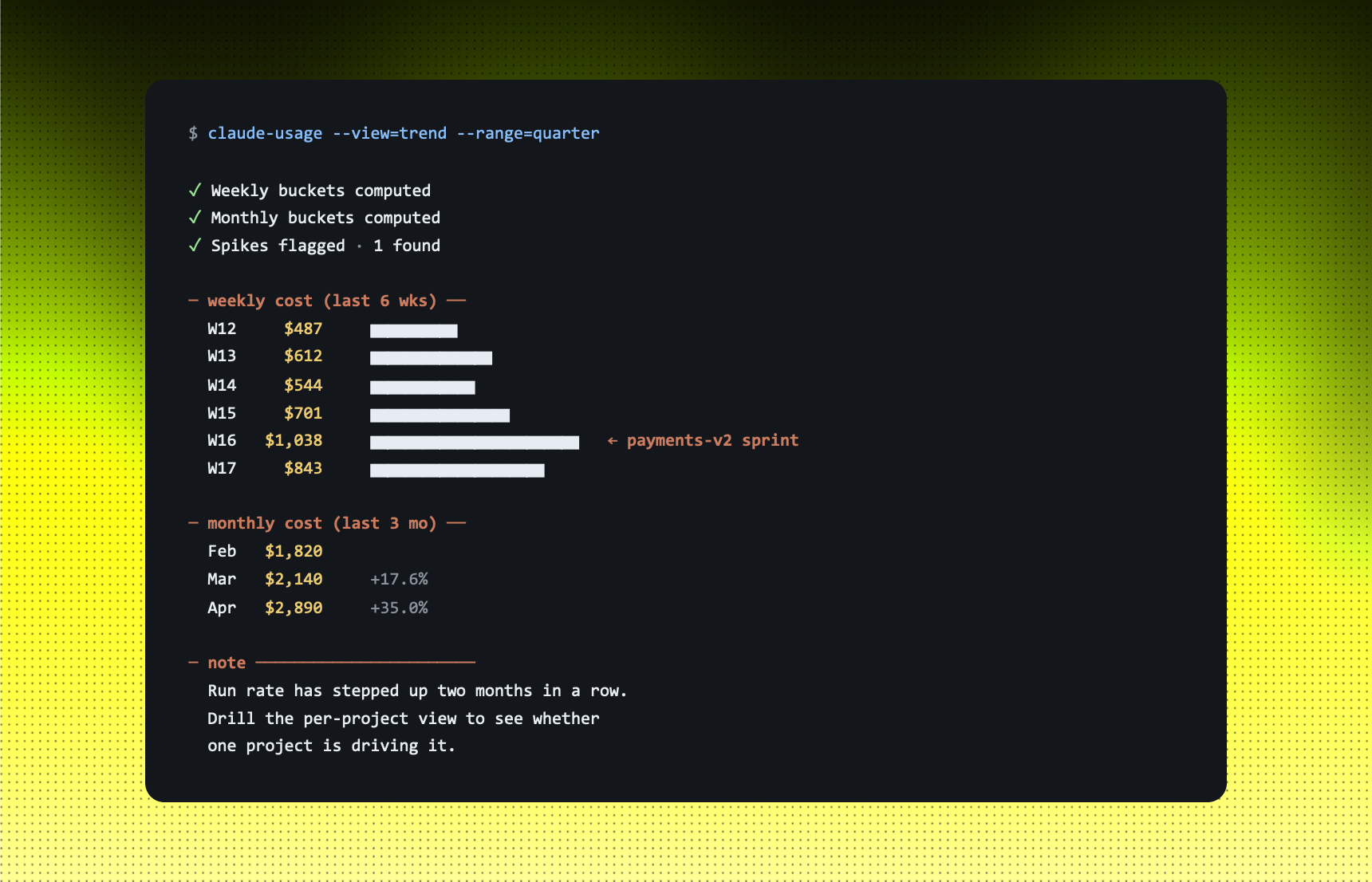
A snapshot tells you where you are. A trend tells you where you're going. The week-on-week view is the chart you bring to the founder/finance call once a month, the one that turns "are we OK with the AI bill" from a feeling into a slope.
The shortcut: the trend view buckets every session into a week and a month, plots the cost, and stacks the curves so you can read both rhythms on the same screen. Spikes line up with sprints. Drops line up with holidays or stalled projects. You're not looking at numbers anymore, you're reading a story.
Example: LAST SIX WEEKS + LAST THREE MONTHS
You run: "Show me the team's Claude spend curve, weekly and monthly."
STRENGTHS
- Weekly view catches a sprint spike the same week it lands.
- Monthly view is the chart that belongs in the budget conversation.
- Spikes annotate themselves once you map them to features shipped.
LIMITS
- Curves don't explain themselves, pair with a release log.
- A drop can mean better caching, or it can mean a stalled project.
- One-week views are noisy. The monthly view is where decisions live.
Use this when: it's the end of the month and you need to decide whether to raise the AI budget cap, hold it, or push back on a project that's eating it.
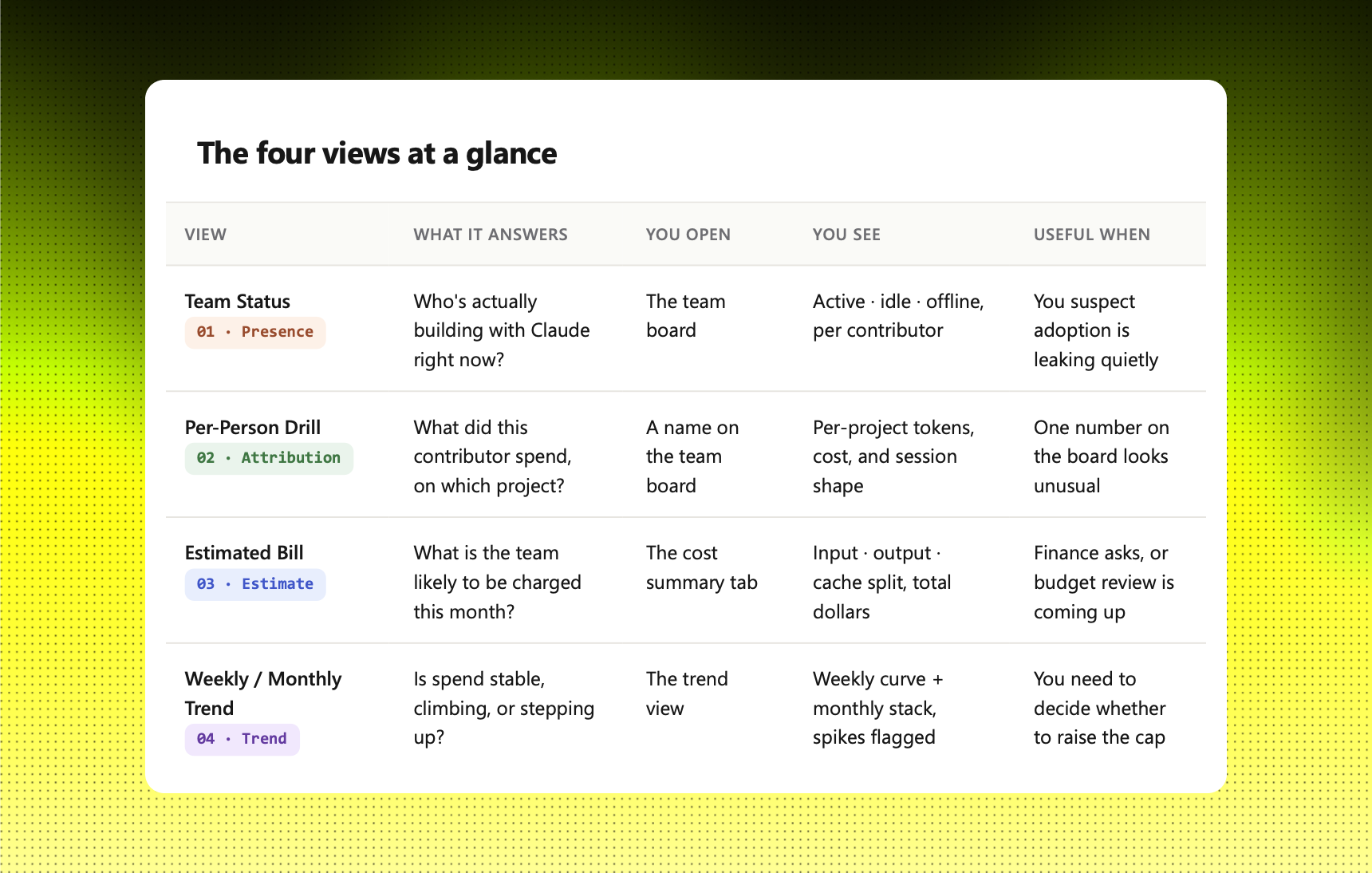
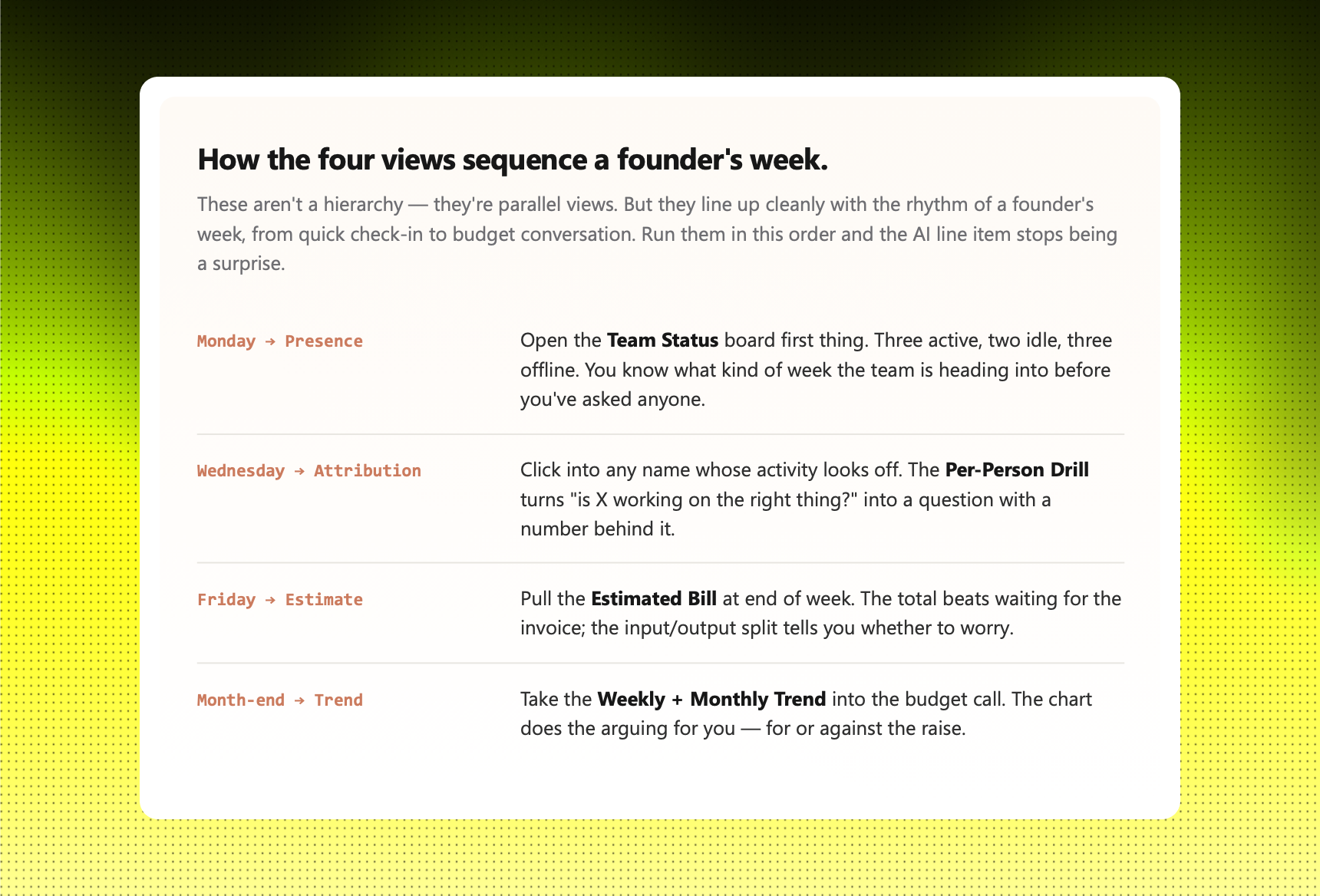
The four steps at a glance
How to start.
Set the dashboard up against the project with the noisiest token bill, the one where you couldn't tell a colleague this morning how much it's costing per week. That's the project where visibility pays back fastest.
Run the weekly view for two cycles before doing anything with the data. The first week is calibration; the second is the one where the numbers start to mean something. Resist the urge to act in week one; a single week of token spend tells you almost nothing about whether a project is on track.
By the end of the second month, you'll notice a different conversation. The questions get sharper. "Is the AI budget OK" becomes "what's driving the W16 spike - is payments-v2 still active?" That's the shift. Conviction backed by a number, instead of conviction in place of one.
Founders who run their AI build budget on visibility don't have a cheaper team. They have a clearer one.