
The 8 Tools We Actually Kept
By Zeel Jain
Eight tools across five friction points. All still running. Here's what each one does, what it replaced, and when the switch makes sense.
The 8 tools our team actually kept.
Eight tools across five friction points. All still running. Here's what each one does, what it replaced, and when the switch makes sense.
8
tools in the stack
0
dropped after 90 days
~14h
saved per week across the team
Most software gets trialled for a quarter and quietly shelved.
The tools that last aren't the most full-featured. They're the ones matched to a specific friction point that was already costing time every single day.
The way you pick software usually goes: someone on the team hears about a tool, you sign up, you use it for two weeks, the enthusiasm fades, and six months later it's an unused line on the company card. That's not a discipline problem. It's a matching problem. You added capability before you named the bottleneck.
Every tool in this stack started as a specific complaint. Meetings produced notes that nobody wrote down. Email interrupted focused work every 20 minutes. Every prototype idea sat in a queue waiting for dev availability. When you match the tool to the exact complaint, it sticks. When you add a tool because it seems useful in general, it doesn't.
The shift: Stop evaluating tools by what they can do. Evaluate them by what specific friction they remove, and whether that friction costs you real time right now.
CATEGORY 01 · ASYNC COMMUNICATION
Granola + Superhuman
Tools that run in the background so you don't have to.
Two things were eating focus before these: typing notes during calls (which meant you weren't actually in the call), and triaging email in between every task. Neither felt urgent enough to fix. Both were adding 2 to 3 hours of dead time every day.
The shortcut: Granola sits in the background and writes your meeting notes for you. You open it before the call, close the laptop when you're done, and a structured summary is waiting. Superhuman is opinionated about your inbox in a way that gets you to zero in 20 minutes and keeps you there. The combination means async communication stops being a drag on the rest of the day.
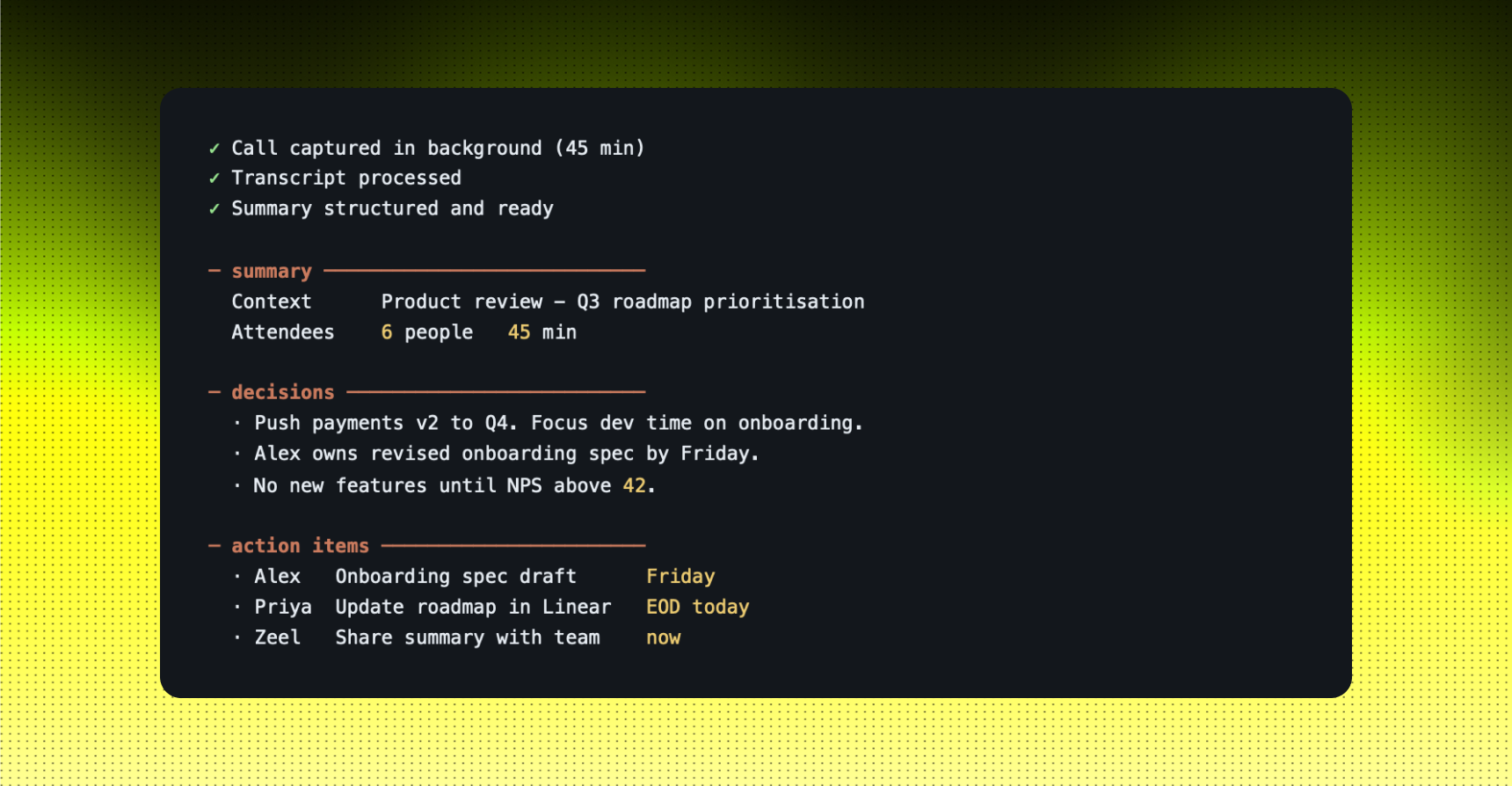
Example: POST-CALL SUMMARY, 45-MINUTE PRODUCT REVIEW
You open Granola before the call. You say nothing to it. You close your laptop when the meeting ends.
STRENGTHS
- Granola requires zero effort during the call, notes happen without you
- Superhuman keyboard shortcuts get inbox to zero faster than any other client
- Both tools work in the background, they don't add a step to your workflow
LIMITS
- Granola needs to be running before the call starts, you can't add it retroactively
- Superhuman has a real learning curve with shortcuts; expect a slow first two weeks
- Neither replaces judgment on what actually matters in a meeting or an inbox language
Use this when: meetings are producing no written record and email is interrupting focused work more than three times a day.
CATEGORY 02 · BUILDING FAST
Lovable
Prototype before you write a spec.
Every internal tool idea was going into a queue. Lead tracker, client portal, onboarding checklist with logic, none of them were complex, but all of them needed dev time, and dev time was being spent on product. The ideas either died in the queue or got built badly by someone who wasn't sure exactly what was needed.
The shortcut: Lovable takes a plain-language description and returns a working prototype in minutes. The prototype is real code, not a mockup. You show it to stakeholders, collect actual feedback, and only then decide whether to invest dev time in a production version. The ideas that were sitting in queues for months now get validated in an afternoon.
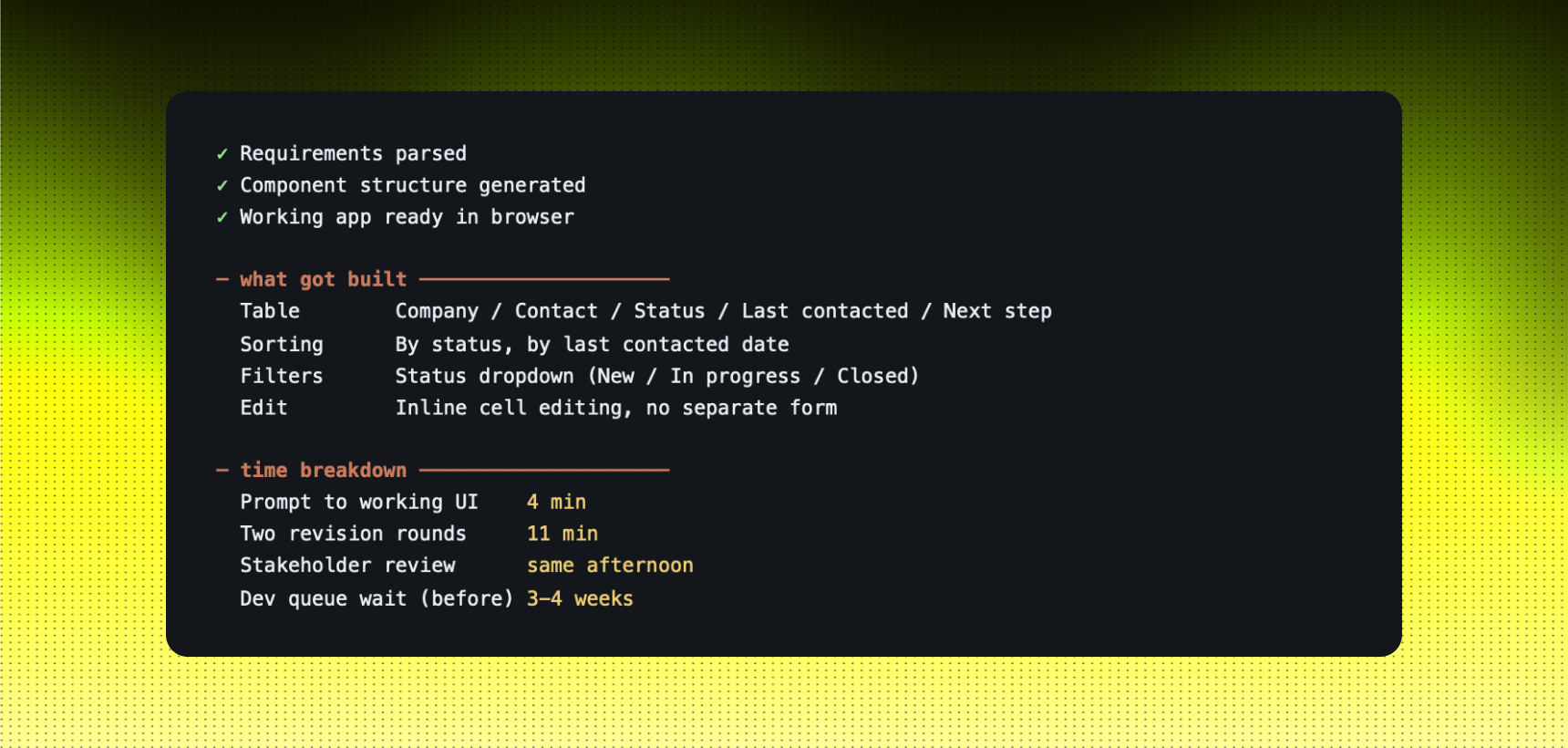
Example: INTERNAL LEAD TRACKER, BUILT IN ONE SESSION
You tell Lovable: "Build a lead tracker with columns for company name, contact, status (new / in progress / closed), last contacted date, and next step. Make it sortable by status."
STRENGTHS
- Non-technical team members can build and iterate without dev involvement
- Real working code, not a Figma mockup, stakeholders react to something they can actually use
- Kills bad ideas fast before they get scheduled into a sprint
LIMITS
- Complex business logic still needs a developer to review and productionise
- Not for anything customer-facing or security-critical without a full code review
- Quality of output depends heavily on the specificity of the prompt
Use this when: a useful internal tool has been sitting in the ideas backlog for more than two weeks because nobody has had dev time to scope it.
CATEGORY 03 · VIDEO & VOICE
Descript + ElevenLabs
Content that used to take a day now takes an hour.
Video editing was a bottleneck every single time. Not because the edits were complex, but because the process was: export, import, scrub, cut, re-export, check sync, re-export again. And voiceovers required either booking a studio block or settling for text-to-speech that sounded like a 2015 GPS.
The shortcut: Descript turns the transcript into the edit. You read the transcript, delete the words you don't want, and the video removes those clips automatically. Filler words gone in two clicks. Pacing tightened without touching a timeline. ElevenLabs handles voiceovers that sound like a real person; consistent voice across every piece of content, no booking required.
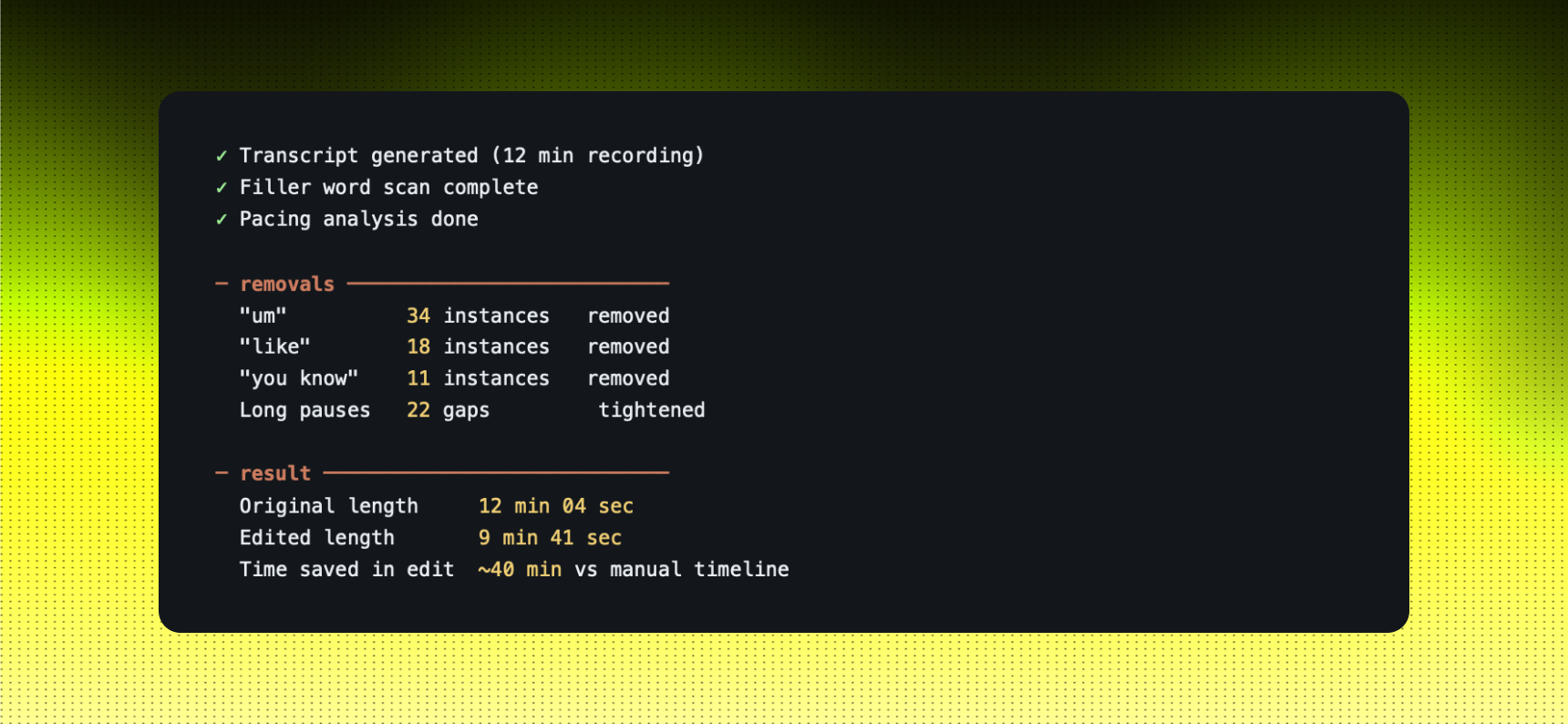
Example: CLEANING A 12-MINUTE RECORDED WALKTHROUGH
You open the recording in Descript. You select Remove filler words and Tighten gaps over 0.8 seconds.
STRENGTHS
- Anyone who can read a transcript can edit video, no timeline experience needed
- ElevenLabs voice is consistent across every piece of content, unlike human recordings
- Turnaround on a 10-minute video drops from hours to under 30 minutes
LIMITS
- Descript AI edits need a human review pass, some removals affect meaning
- ElevenLabs requires time upfront to clone and tune a voice before it's production-ready
- Complex multi-camera edits still need a traditional editor for the assembly cut
Use this when: video content is a growth channel and editing is the reason it's not shipping consistently.
CATEGORY 04 · VISUAL CREATION
Midjourney + Gamma
Visual output with out a designer available.
Two recurring bottlenecks: reference images for client presentations took half a day to source or create, and decks took even longer because building structure and building slides happened at the same time. Every visual request competed for the same designer hours as production work.
The shortcut: Midjourney generates reference imagery and visual concepts from a text description. You get 4 options in 60 seconds and iterate from there. Gamma takes a bullet-point outline and returns a structured, designed deck that you then refine rather than build from scratch. The designer stays on production; the reference work and early-stage decks stop being requests.
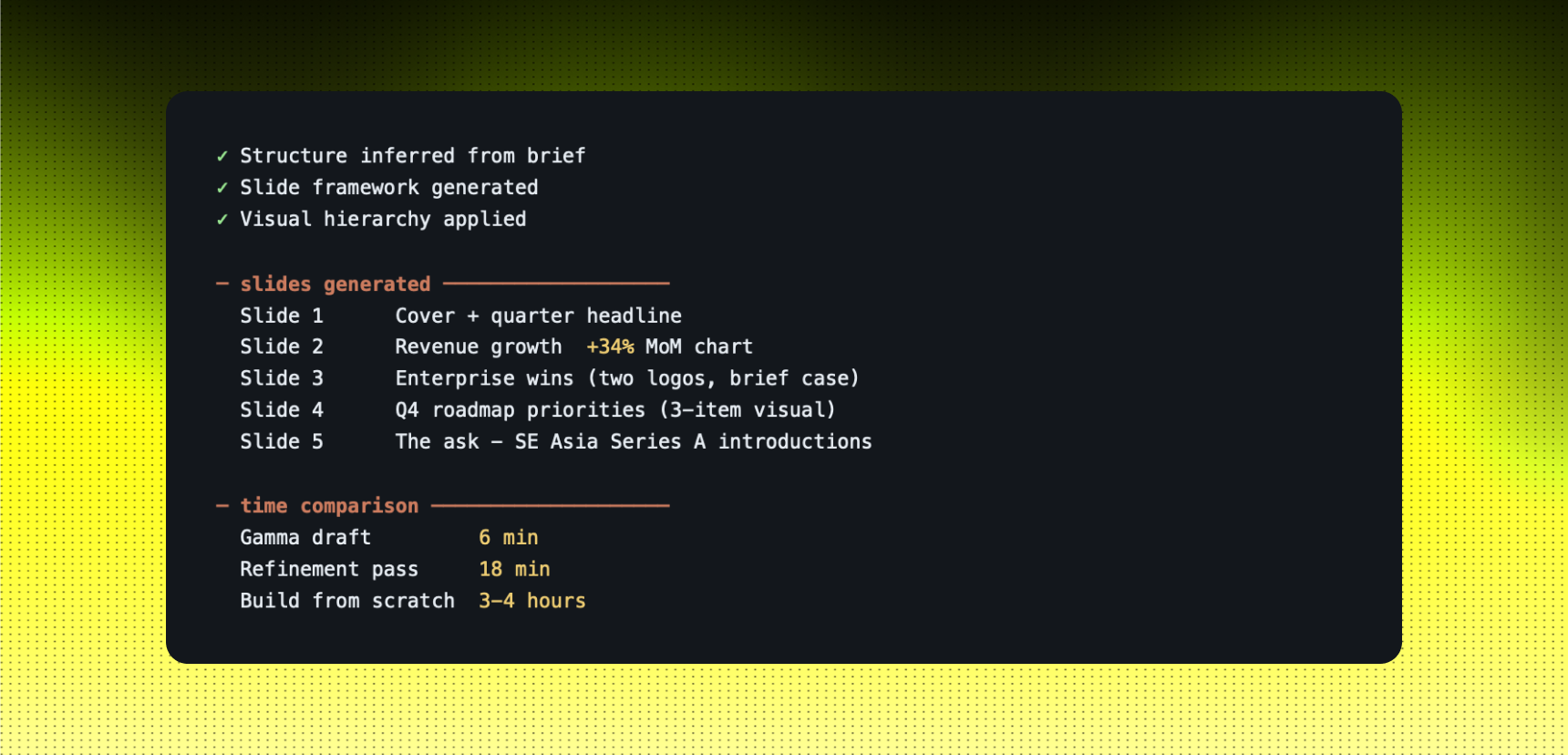
Example: INVESTOR UPDATE DECK FROM A BULLET-POINT BRIEF
You paste into Gamma: "Q3 update for investors. Sections: revenue up 34%, two enterprise wins, roadmap priorities for Q4, ask for introductions to Series A funds in Southeast Asia."
STRENGTHS
- Gamma structures information automatically, you edit intent, not layout
- Midjourney gives 4 visual directions in under a minute, which is faster than briefing a designer
- Both tools produce a starting point that's good enough to react to immediately
LIMITS
- Midjourney has a real prompt learning curve, vague prompts produce vague images
- Gamma decks need brand adjustments before they go to any external audience
- Neither replaces a designer for anything that needs to be polished and on-brand
Use this when: visual requests are sitting in a queue behind production work, or decks are being built from a blank slide.
CATEGORY 05 · OPERATIONS
Linear
Priorities are only as clear as the tool that holds them.
Jira is built for enterprise teams with a project manager whose job is to maintain it. When you're 5 to 15 people moving fast, the overhead of keeping Jira up to date becomes work in itself. Tickets go stale, priorities drift, and the board stops reflecting what's actually happening. People stop trusting it.
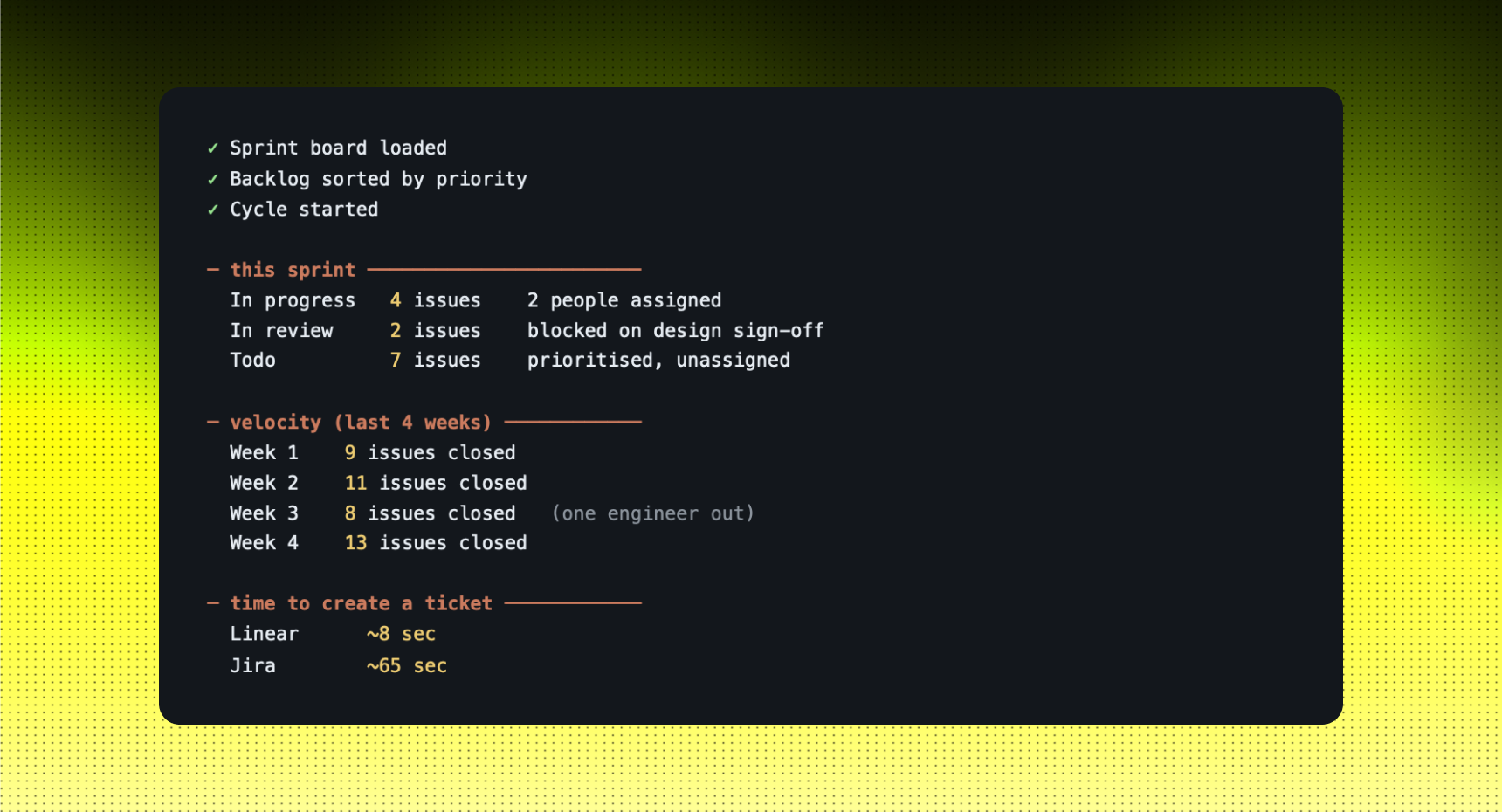
The shortcut: Linear is fast, keyboard-first, and opinionated about structure in a way that matches how small teams actually work. Creating a ticket takes seconds. Status updates happen because the UI makes them easier than ignoring them. The board stays current because maintaining it costs almost nothing.
Example: WEEKLY SPRINT SETUP FOR A 6-PERSON PRODUCT TEAM
You open Linear on Monday morning. Keyboard shortcut to create an issue, type the title, assign, set priority; no form, no page reload.
STRENGTHS
- Keyboard-first, creating and updating tickets is fast enough that people actually do it
- Clean interface means the board reflects reality instead of becoming a graveyard of old tickets
- Cycle and project views give a genuine picture of what's moving and what's stuck
LIMITS
- Less powerful for complex multi-project hierarchies that enterprise Jira handles well
- Reporting is basic compared to Jira's advanced dashboards
- Migration from an existing Jira setup takes more time than it looks
Use this when: the project board stopped being trusted by the team, and tickets are being tracked in Slack threads or personal to-do lists instead.
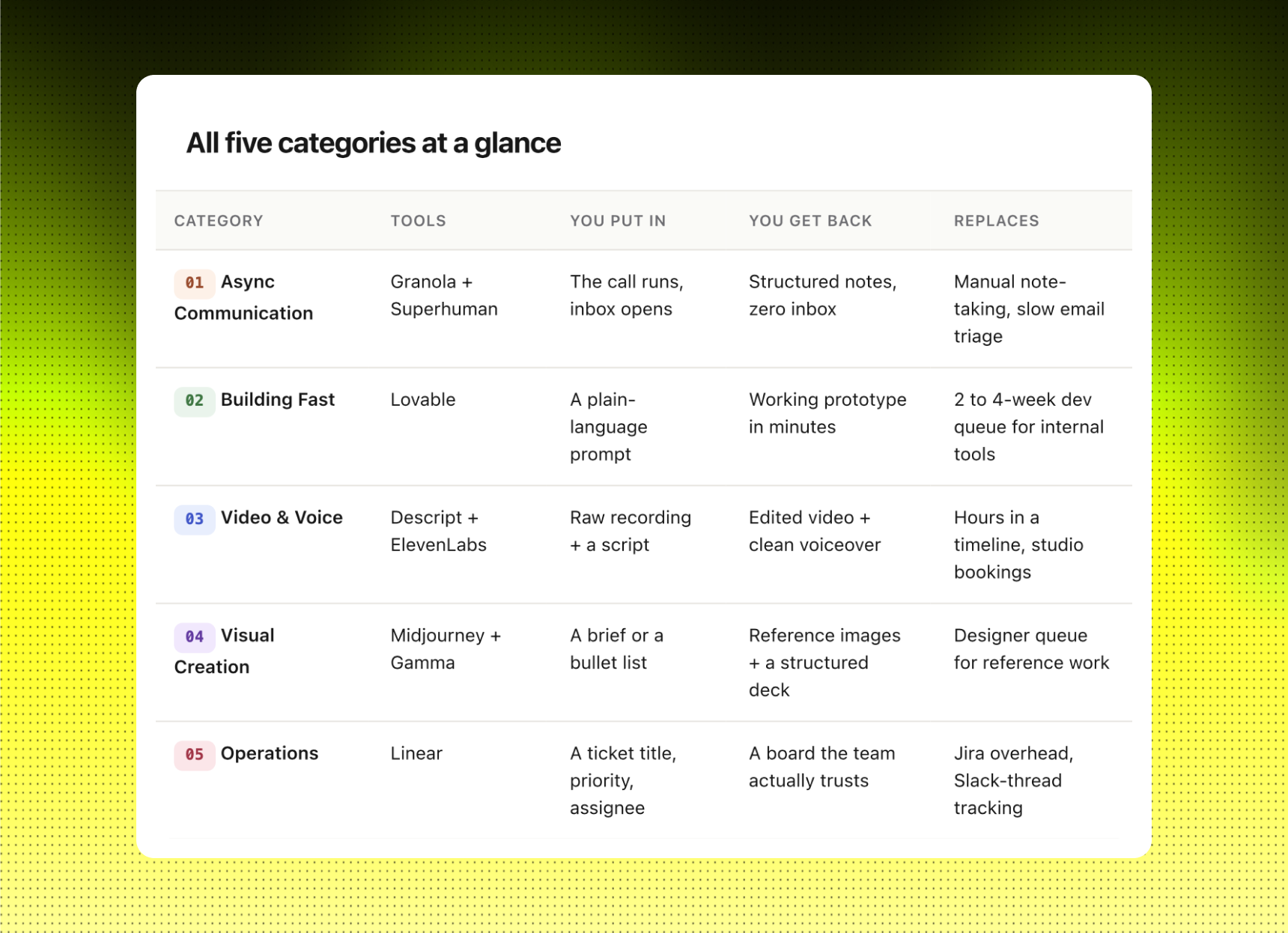
The five categories at a glance.
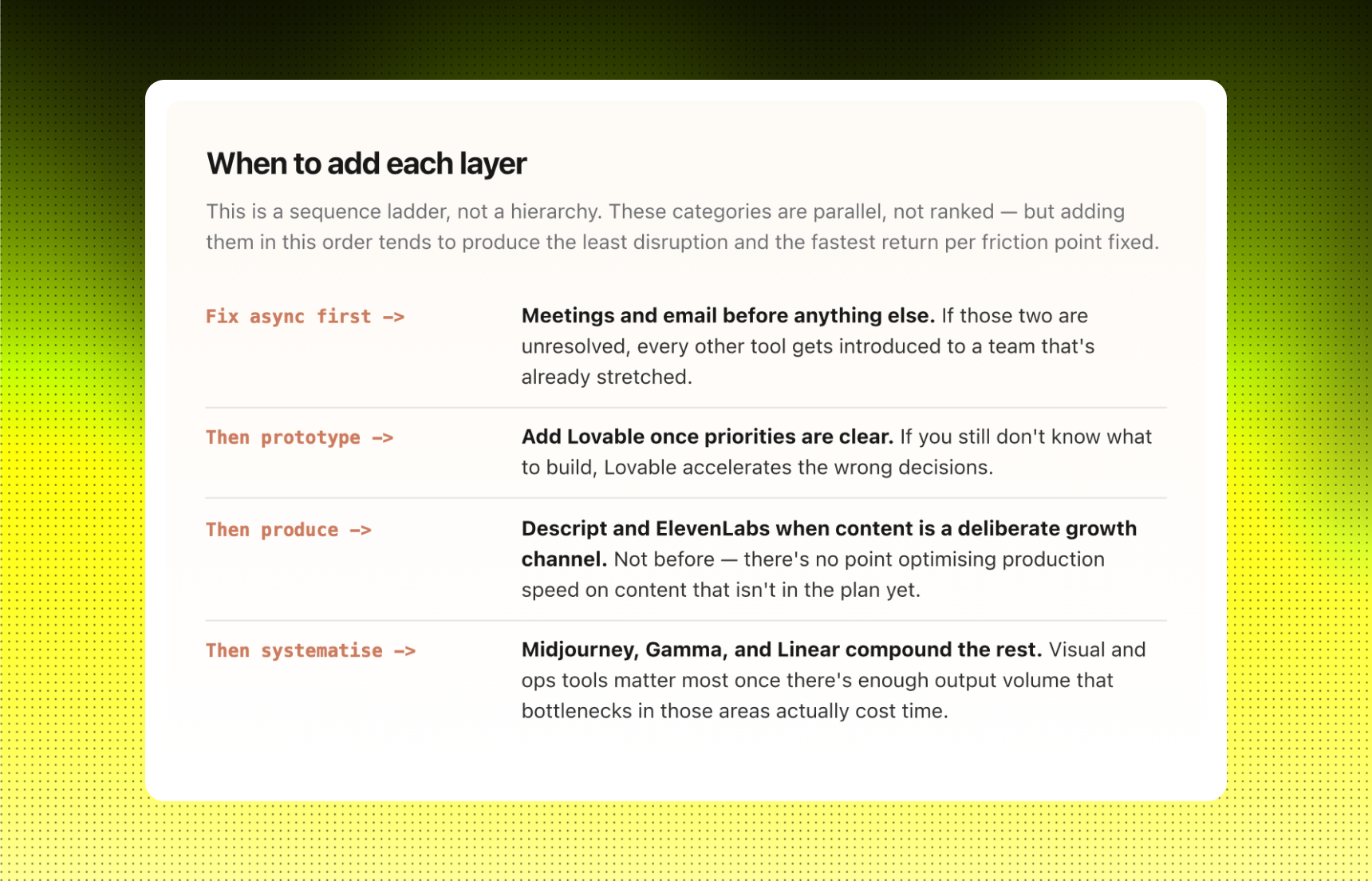
How to start.
Start with Granola. It asks nothing from you. Open it before tomorrow's first call, close your laptop when the meeting ends, and see what the summary looks like. If it captures what mattered, you've added 30 minutes back to your day without changing how you work at all.
From there, name the actual bottleneck. Not "we should be more efficient with video", that's a category. The bottleneck is "we recorded four walkthroughs last month and none of them got edited because nobody had time to sit in a timeline." That's the sentence that points at Descript.
Each tool in this list exists because someone on the team said a specific thing that was costing them specific time. That's the only evaluation that matters.