
GoogleIO 2026 - A Field Guide
By Zeel Jain
FIELD GUIDE - GOOGLE I/O 2026
Google rebuilt its entire stack for the agent era.
Eight announcements from one conference, and the pattern across all of them is the same: software that acts without being asked.
8
major announcements
24/7
Spark operation
25 yrs
since last Search rebuild
Google didn't release features at I/O 2026. It changed the unit of work.
Every product Google touched this year follows the same logic. The old model: you open a tool, you do a thing, you close the tool. The new model: you describe a goal, the tool disappears, and the thing gets done.
That shift sounds subtle. It isn't. Spark runs on a virtual machine while your laptop is off. The new Search books the restaurant before you leave the results page. Universal Cart completes the purchase when the price is right. These aren't convenience features. They're products that operate in time you weren't planning to use.
The model underneath all of it is Gemini 3.5, the first version Google built specifically for multi-step reasoning and action, not just response. Everything else at I/O is an interface built on that foundation. Understanding the foundation explains why every surface looks different this year.
The shift: AI that waits for your input is becoming AI that works on your behalf. The products at I/O 2026 aren't features added to existing tools. They're the first round built on the assumption that your time is the scarce resource, not the software's capability.
01 · FOUNDATION · MODEL LAYER
The model built to act, not just answer.
Multi-step reasoning, designed to run.
Most AI tools released in the last two years share the same flaw. They're built for conversation, not for work. You ask, they respond. You evaluate, you ask again. Every loop costs attention and time, and the overhead sits entirely on your side of the exchange.
The shortcut: Gemini 3.5 is the first Google model designed from the ground up for agentic workflows, not retrofitted for them. It plans, reasons across steps, and executes without requiring you to stay in the loop after the initial brief. You describe the goal. It figures out the path.
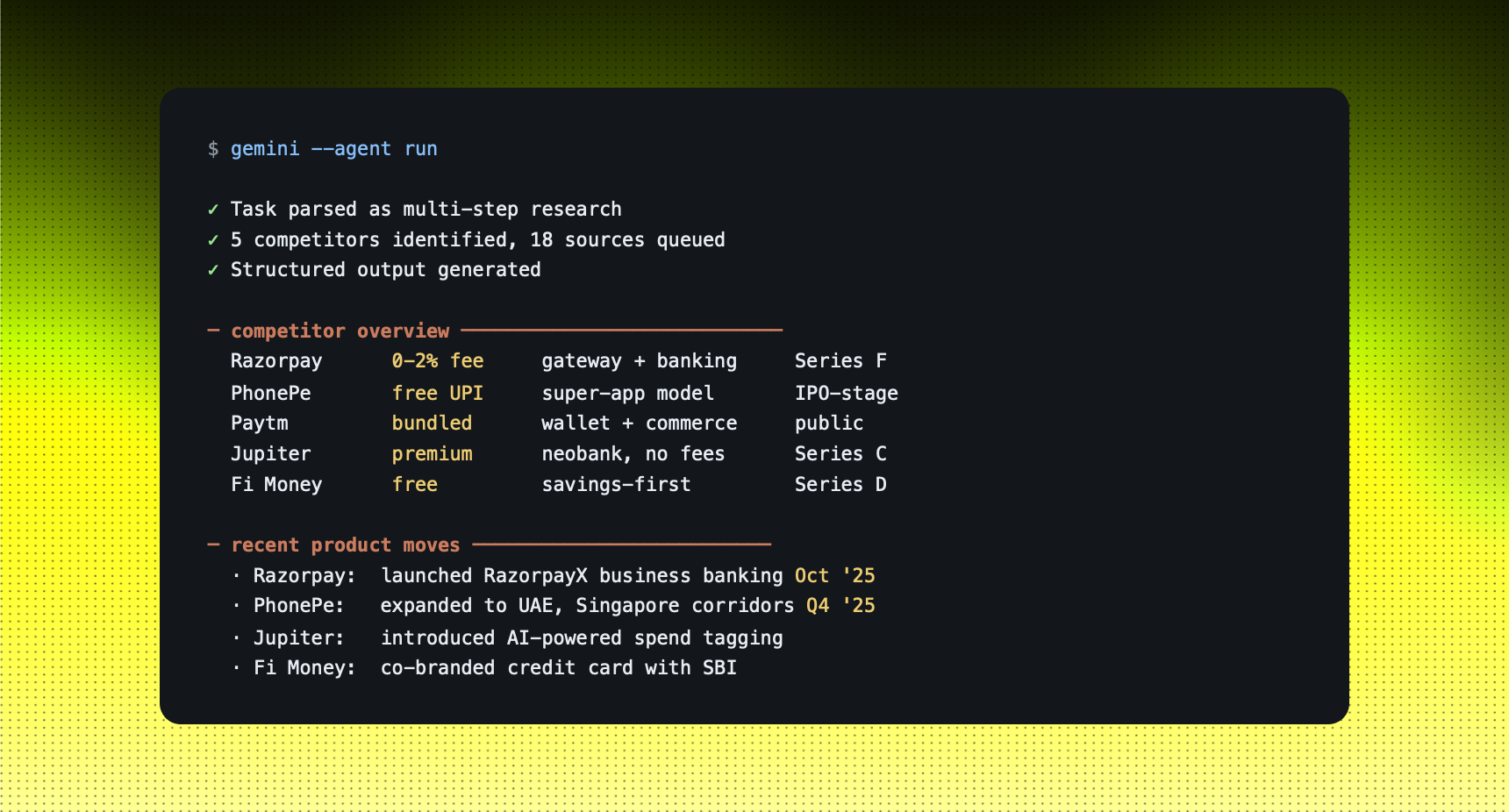
The practical difference is in what you can hand it. A research question that would normally require four prompts becomes one. The model breaks it down, works the steps, and returns a structured output. You review, not manage.
Example: COMPETITIVE RESEARCH BRIEF
You tell Gemini 3.5: "Research the top five competitors in the Indian fintech space. For each one: current pricing structure, two key differentiators, and their most recent product move."
STRENGTHS
- Plans multi-step tasks without requiring a chain of prompts from you
- Handles ambiguous briefs and breaks them into sub-tasks independently
- Foundation layer powering every other product Google shipped at I/O
LIMITS
- Still makes errors on complex numeric analysis and financial reasoning
- Works best with goal-framed prompts, not wide-open exploratory questions
- Can't replace a domain expert who knows what matters vs. what's noise
Use this when: You have a defined goal that requires more than one step to reach, and you want to hand it off entirely rather than manage it turn by turn.
02 · AGENT LAYER · ALWAYS - ON
Your tasks run while you're not watching.
A virtual machine for your work.
Every AI tool today requires you to be present. You open a chat, run a task, wait for output. When you close the window, it stops. That model works for fast lookups. It doesn't work for anything that takes real time or needs to run on a schedule you didn't plan around.
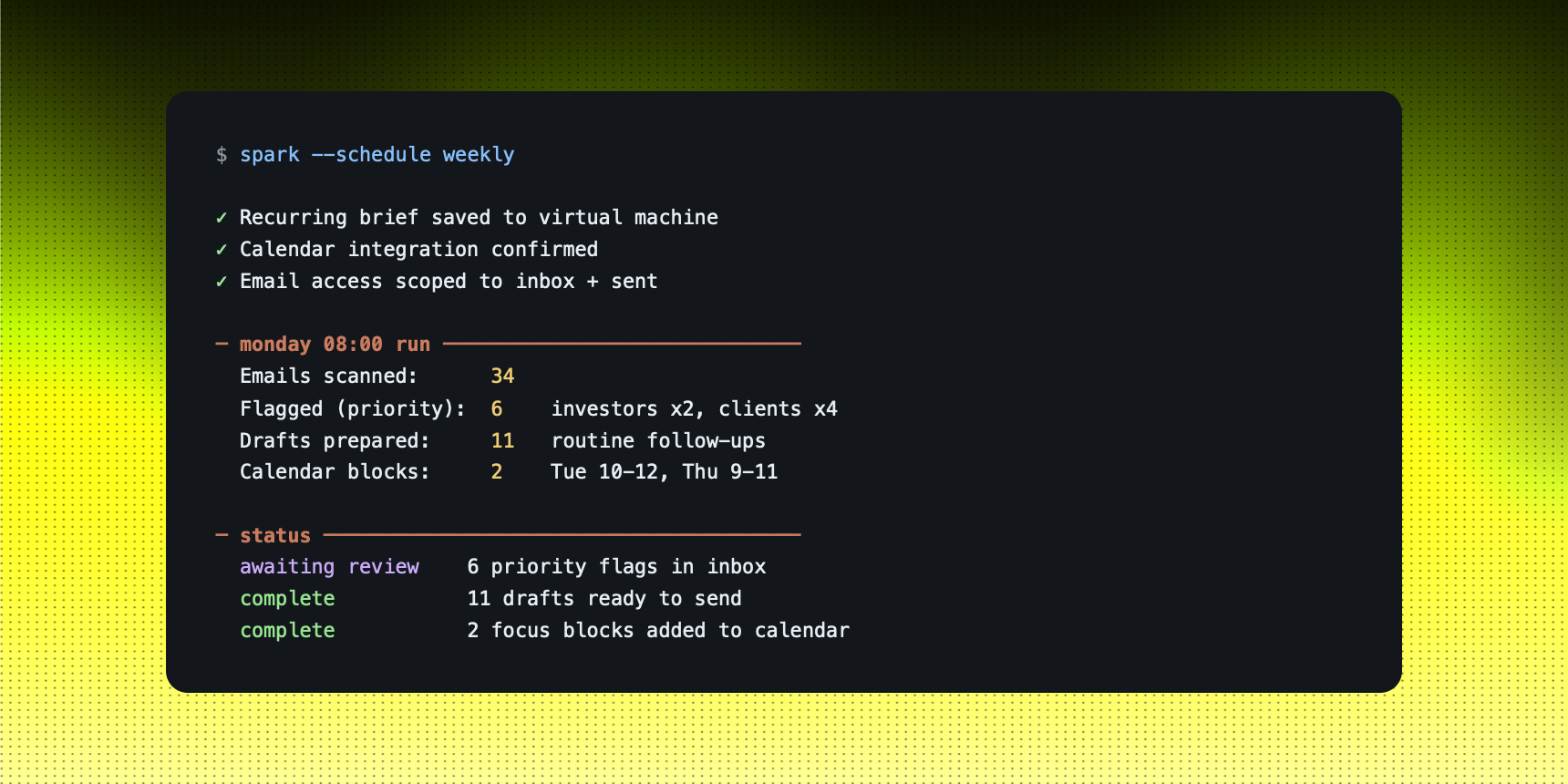
The shortcut: Spark runs on a dedicated virtual machine, persistent, operating whether your laptop is on or off. You describe what needs to happen, draft a report, block time in the calendar, follow up on pending threads, and you return to a completed state. The work happened in time you weren't using.
The way to think about it: Spark isn't a chat window you leave open. It's a system you configure once and trust to run. The upfront cost is writing a clear brief. The return is every recurring task that runs without you touching it.
Example: WEEKLY OPERATIONS BRIEF
You tell Spark: "Every Monday at 8am: pull unread emails from the last 48 hours, flag anything from investors or clients, draft replies for routine follow-ups, and block two 2-hour focus windows in my calendar for the week."
STRENGTHS
- Works asynchronously, no attention required after the initial brief is written
- Handles multi-step routines without manual triggering every time
- Runs the same brief consistently, without drift or shortcuts
LIMITS
- Requires careful brief design upfront, vague instructions produce vague results
- Not suited for decisions that genuinely need your judgment in the moment
- Complex multi-system task chains will improve in reliability as the product matures
Use this when: You have recurring operational work that follows a consistent pattern and doesn't need a decision from you at each step.
03 · MEDIA LAYER · FORMAT CONVERSION
Any input. Any output.
Media transformation without the pipeline.
Moving between formats is one of the most friction-heavy parts of daily work. Voice note to document. Screenshot to editable brief. Video to written summary. Every conversion is a tool-switching tax you pay with time, and the tools involved rarely talk to each other.
The shortcut: Omni takes any media type and produces whatever output format you need. Photo to video. Video to photo. Voice note to a structured document. The model handles the translation layer, so the entire pipeline collapses to a single step. One input, one output, nothing in between.
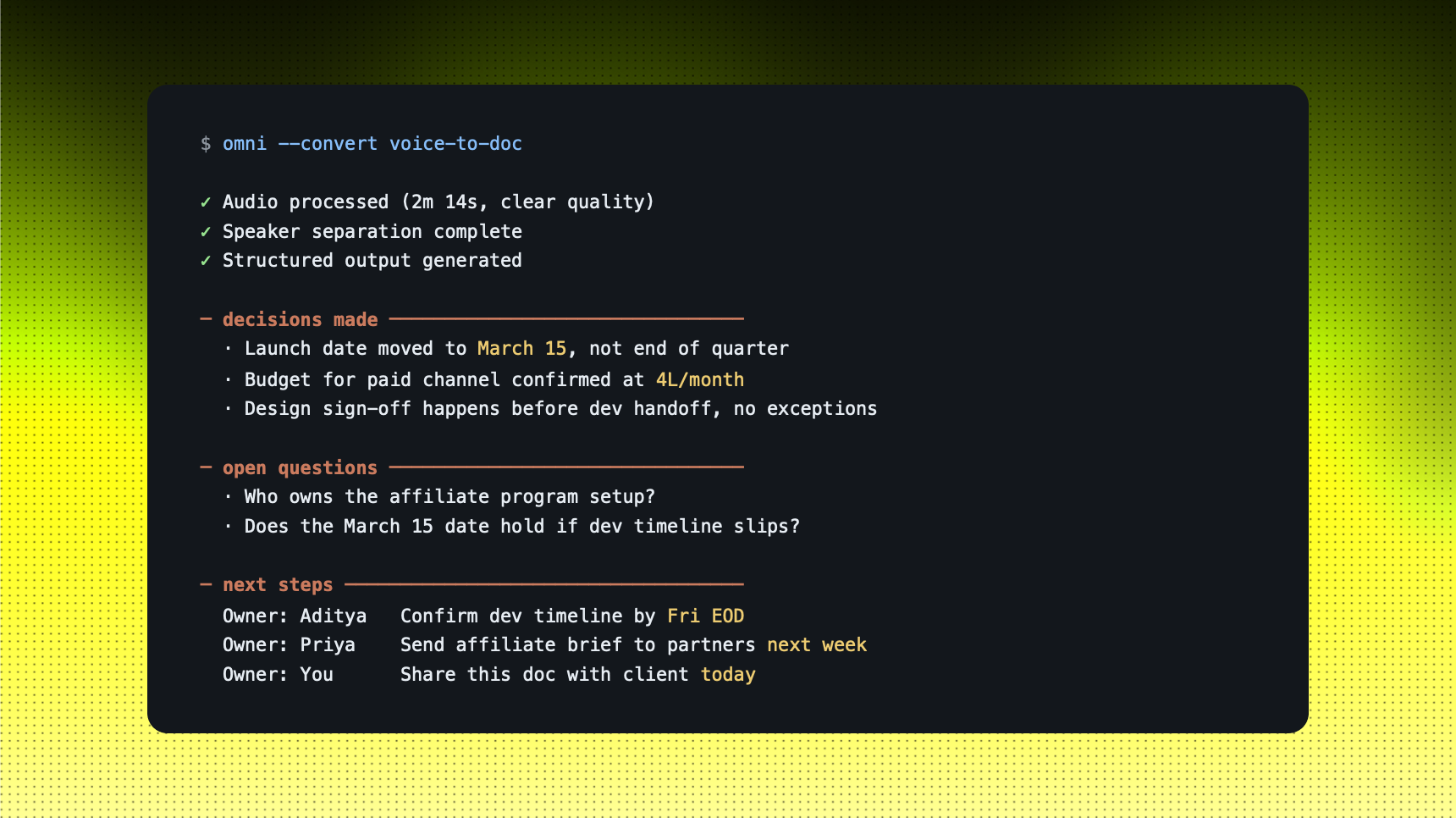
The use case that matters most for most people: you record a voice note on a call, in a car, between meetings, and Omni produces a formatted document you can share. No transcription service. No manual restructuring. The gap between capturing something and sending it closes.
Example: CLIENT CALL TO WRITTEN DEBRIEF
You tell Omni: "Here's a 2-minute voice note from my client debrief. Turn it into a written summary with three sections: decisions made, open questions, and next steps with owners."
STRENGTHS
- Eliminates the format-switching tax across every type of daily work
- Handles all major media types inside one interface, no third-party tools
- Output is structured and shareable, not a raw unformatted text dump
LIMITS
- Audio quality directly affects output quality, background noise degrades results
- Doesn't know your internal terminology or naming conventions without context
- Long-form video conversion is still slow relative to shorter media inputs
Use this when: You have source material in one format and need it in another, and the manual conversion step is the only thing between you and sharing it.
04 · COMMERCE LAYER · ACTION-FIRST SEARCH
Search that completes the action.
From finding to doing, in one bar.
Google Search has been structurally the same product for 25 years. You type, it shows results. You click, navigate, fill out forms. The job of search was to start your journey, not finish it. That's what changed at I/O this year, and it's the most visible shift in the consumer product.
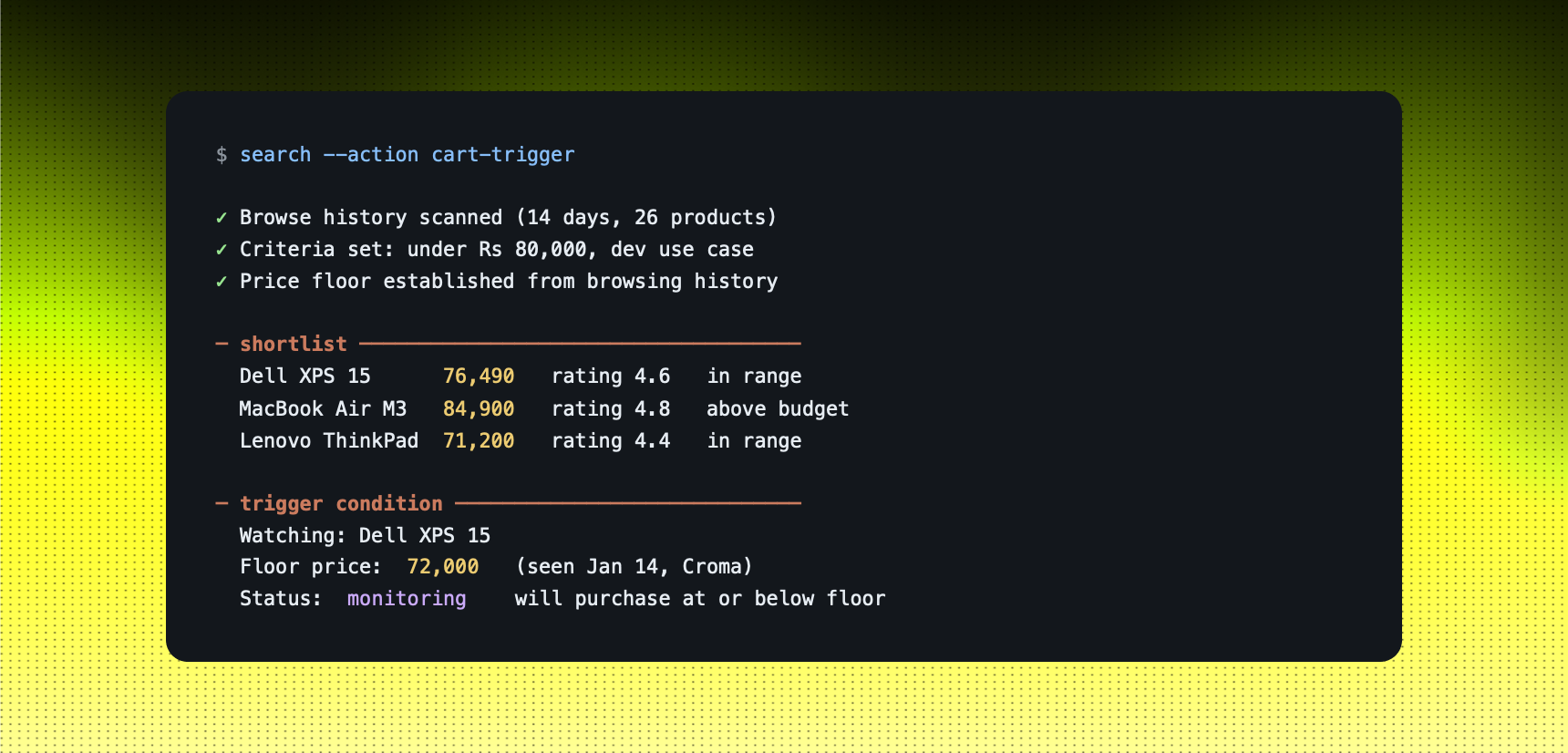
The shortcut: The new Search lets you take direct actions from the results page. Book the table. Complete the purchase. Trigger the event. Universal Cart layers on top of that: one persistent cart across the entire web that tracks your browsing history and executes when your criteria are met. You set the logic once. The system watches and acts.
The combination is more significant than either part alone. You don't need to be present at the moment of purchase. You define what you want, at what price, from which shortlist. The rest is automatic.
Example: LAPTOP RESEARCH TO PURCHASE
You tell Google: "I've been looking at laptops under 80,000 rupees for development work for the last two weeks. Buy the best-reviewed one in that budget when it hits the lowest price I've seen this month."
STRENGTHS
- Collapses the entire research-to-purchase funnel into a single set of criteria
- Universal Cart removes the friction of comparing across multiple retailer tabs
- Action-first results cut time between intent and completion significantly
LIMITS
- Cart intelligence depends on how clearly your browsing signals your actual intent
- Not every retailer is integrated at launch, coverage will expand over time
- Auto-purchase triggers require well-written criteria, review them before activating
Use this when: You have a well-defined purchase or booking intent and the barrier is logistics and timing, not the decision itself.
05 · WORKSPACE LAYER · LIVE TOOLS
The software that listens while you work.
Documents that write as you talk.
The last mile of knowledge work, turning raw thinking into a shareable artifact, still carries the most friction. You think on a call, walk out with ideas, and then sit down and type. The gap between what happens in a room and what ends up in a document hasn't meaningfully changed in 20 years.
The shortcut: Google Docs now accepts voice input directly. You dictate, it writes, formats, and saves. Ask YouTube pulls answers from any video without you scrubbing through a timeline. Gemini for Science connects to Co-Scientist and AlphaEvolve so researchers can go from hypothesis to experiment design without building a full team behind them first.
The pattern across all three is the same: the gap between having the information and producing the artifact closes. One less step between thinking and sharing. For anyone whose bottleneck is the documentation layer, not the thinking layer, that's a meaningful change.
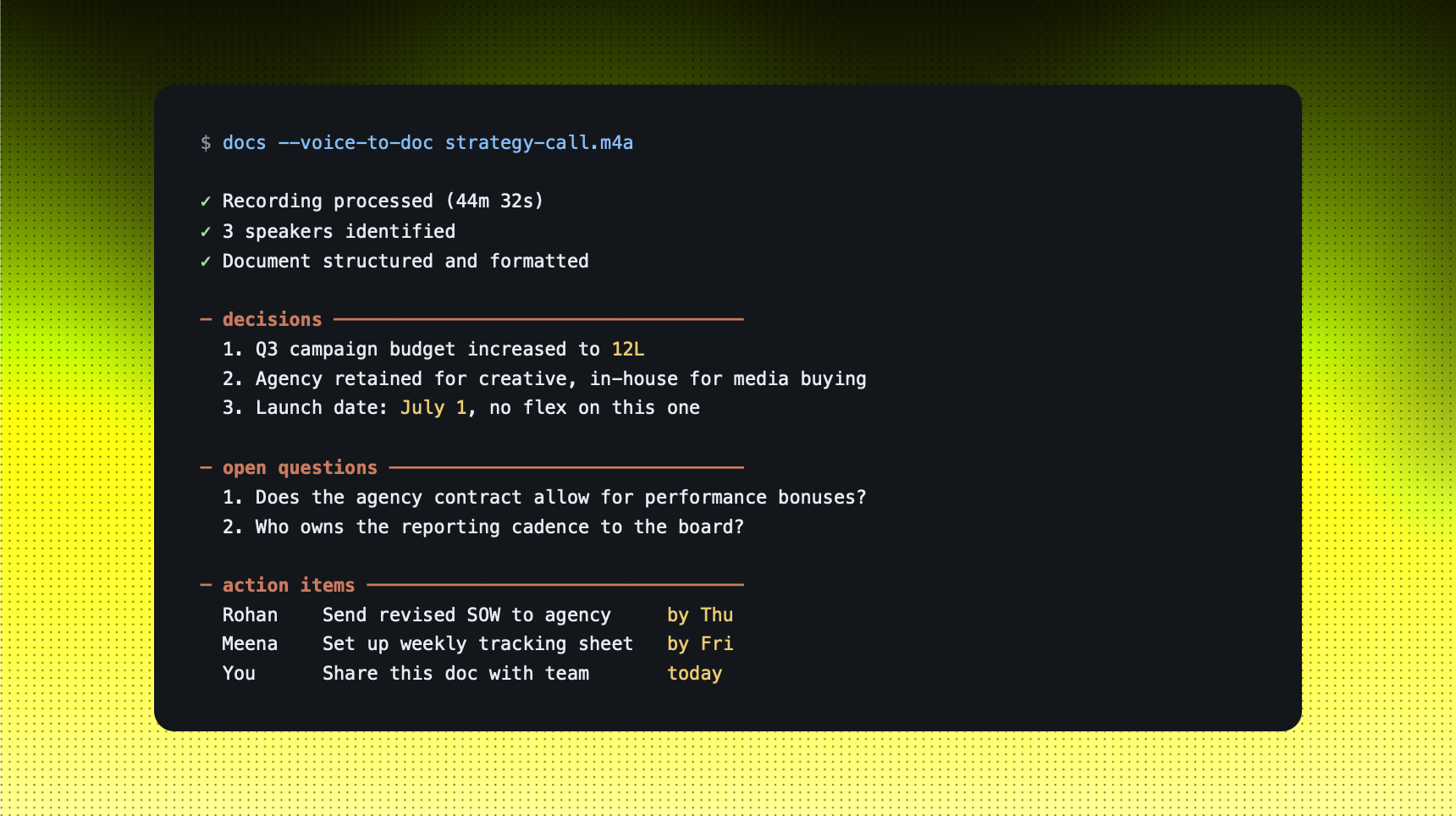
Example: POST-MEETING DOCUMENTATION
You tell Google: "Here's the recording from today's 45-minute strategy call. Pull out the three decisions we made, the two open questions, and all action items with their owners. Format it as a clean doc I can send to the team today."
STRENGTHS
- Removes the manual transcription and formatting step from every meeting
- Ask YouTube makes long-form video content searchable and queryable
- Science tools put research infrastructure within reach of smaller teams
LIMITS
- Voice quality and ambient noise still affect output accuracy significantly
- Ask YouTube is limited to public content, not your private video library
- Science tools are designed for researchers who already know their domain well
Use this when: our biggest bottleneck is the gap between having information and producing a document version of it.
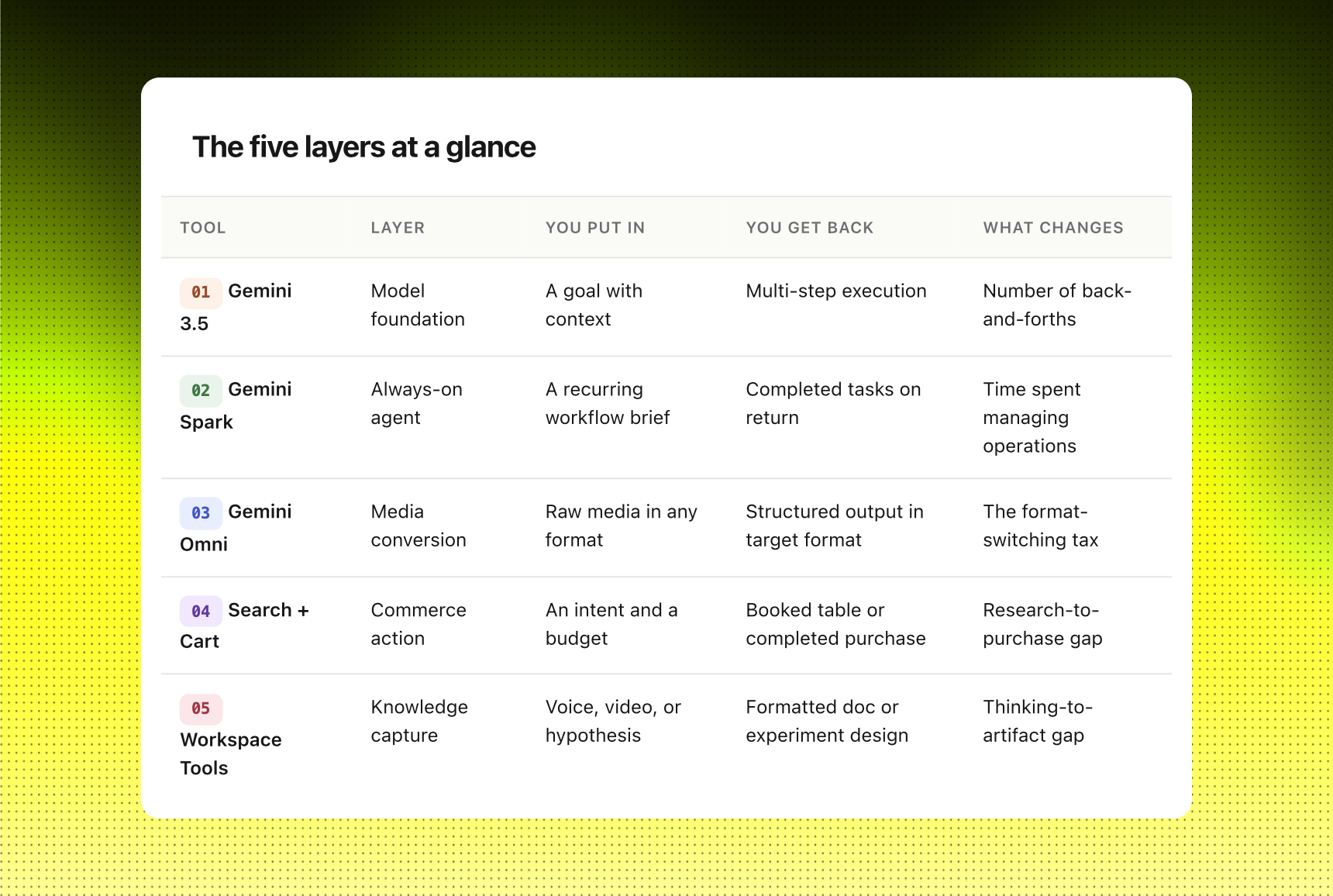
The five layers at a glance
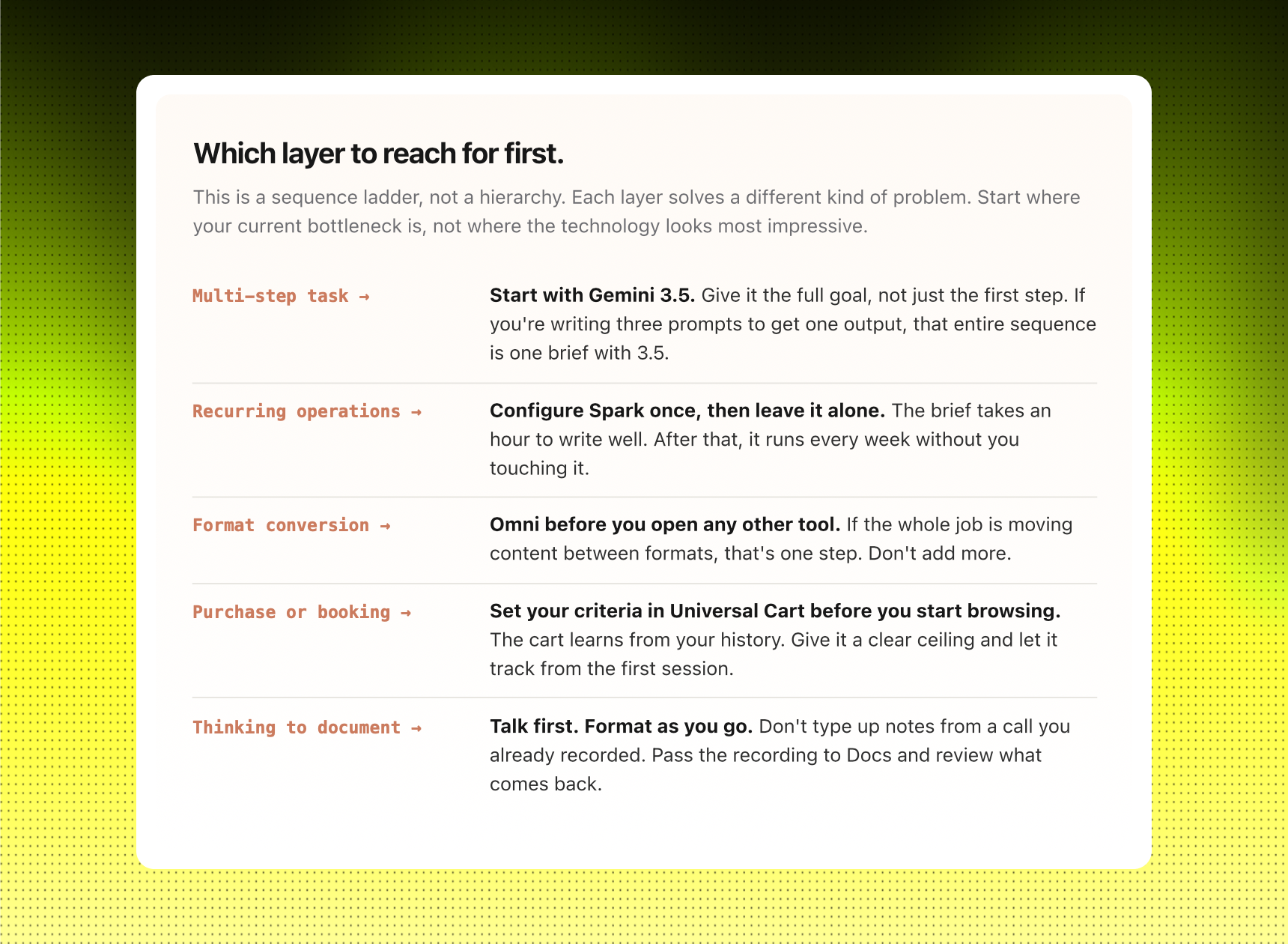
How to start.
If you only have one hour this week, open Gemini 3.5 and give it a task you'd normally break into three separate prompts. A research question, a comparison, a written brief. Hand it all at once. Don't manage the steps. The goal isn't to be impressed by the technology. It's to find the first task in your week you stop managing.
If you have recurring work that runs the same way every Monday, the Spark brief is worth the hour it takes to write clearly. Once it's running, you come back to review, not to redo. That's the return on the setup cost.
The rest of the tools follow the same principle. You find your bottleneck. You hand it off. The shift at I/O 2026 isn't a new product category. It's a new assumption built into every surface: the software should be working in the time you weren't using anyway.